How to Bypass Chipotle Bot Detection: Web and API Guide
This guide covers Chipotle bot detection bypass for the web and API traffic of chipotle.com, for teams that are authorized to collect that data. The short answer: a plain HTTP client usually receives a challenge response (often HTTP 429) instead of the page.
An authorized client can either run a real browser, or fetch the vendor's script itself and post it to the Catmouse solver, which returns the body and the x-kpsdk-* headers for the follow-up request. This guide explains both paths, their limits, and the real call sequence in Python for chipotle.com.
Who this is for
Engineers and data teams who own, or have explicit written authorization to test, Chipotle and want to understand how its Kasada protection is described in this post before deciding on an approach.
On this page
- How Kasada protection appears to a client on chipotle.com
- What a client-side challenge script does
- Where headless browser automation runs into limits
- How to choose between a browser and a solver API
- Calling the Catmouse solver API from Python
- Proxy, billing and errors in the API
- Scope and limitations
- Evidence and sources
- Frequently Asked Questions
- Protection: the Catmouse targets directory lists chipotle.com as Kasada-protected. That label comes from publicly visible challenge behavior and was not re-verified on 2026-10-09.
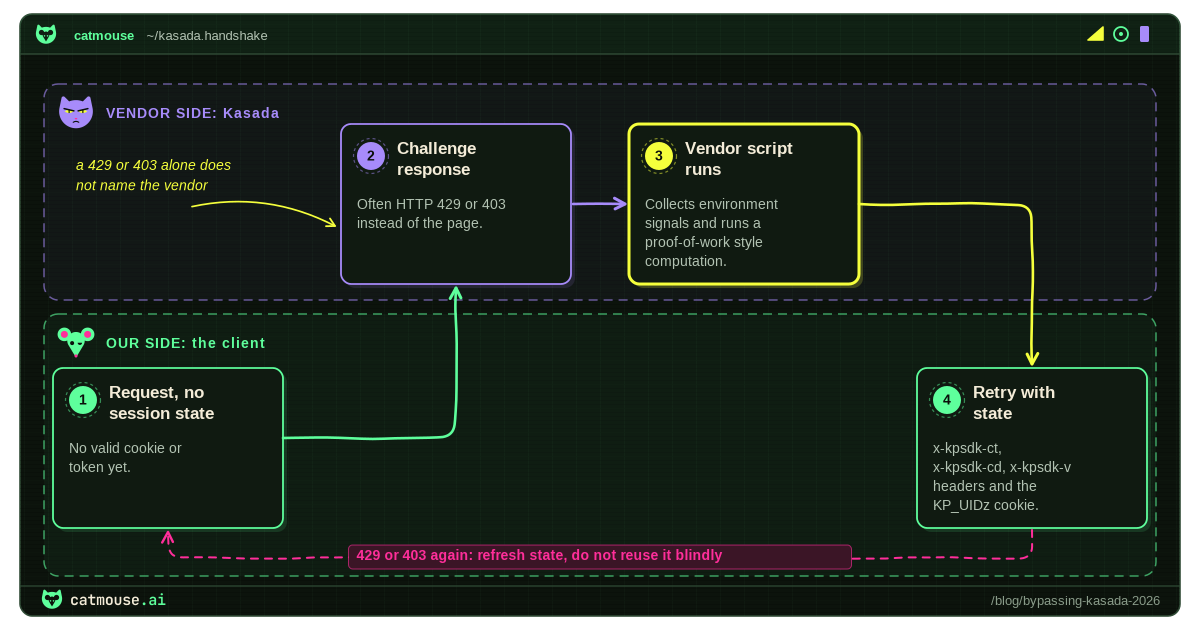
- What you see: a challenge response, commonly HTTP 429 (RFC 6585 section 4), plus a script that must run before session tokens are issued.
- Options: drive a real browser, or fetch
ips.jswith your own client and post it to/Solver/solve, which returns a base64payloadandx-kpsdk-*headers for the/tlrequest, as documented in /openapi.json. - Limits: vendors change their scripts, and no outcome is guaranteed. This article publishes no benchmark for chipotle.com and ran no solve against it.
- Who it is for: engineers who are authorized to collect data from chipotle.com and want to understand the mechanism before choosing a tool.
How Kasada protection appears to a client on chipotle.com?
A client that requests chipotle.com without a valid session is typically answered with a challenge instead of the content. For Kasada deployments this is commonly an HTTP 429 response that carries a challenge script, followed by requests that must include session tokens. HTTP 429 means too many requests in a given time, per RFC 6585 section 4. Here it is used as a challenge signal, so treat it as an observation and not as a guarantee.
Chipotle serves menus, store information and ordering through a website and a mobile app. This article does not claim that the mobile app sits behind the same protection as the website. This article covers the web challenge flow documented in the Catmouse API. It makes no claim about the behavior of the native mobile app or any vendor mobile SDK. Ordering, rewards and account functions involve personal and payment data and are out of scope.
What you can verify yourself
Open the site in a browser with developer tools and record the first requests, the challenge script URL and the headers that appear on later requests. If you see x-kpsdk-* request headers and a KP_UIDz cookie, that is consistent with Kasada. If you do not, the label above may be out of date and the rest of this guide does not apply.
What a client-side challenge script does?
A client-side challenge script runs in the visitor's browser, collects signals about the environment, performs a proof-of-work style computation, and sends the result to the vendor to receive session tokens. The exact steps are obfuscated and change over time, so the list below is a general outline and not a specification.
- Script delivery: the challenge response carries or references a JavaScript file that the client must execute.
- Environment signals: the script reads properties of the browser and device, such as navigator and screen values and rendering behavior.
- Work computation: the client performs a computation whose result the server can check cheaply, which raises the cost of mass automation.
- Token issuance: the script posts its result and receives the tokens that later requests must carry.
Catmouse does not publish the internals of its solver. If you need a detailed, current description of the vendor's script, you have to analyze it yourself on systems you are authorized to test.
Where headless browser automation runs into limits?
Browser automation can work for small jobs, but it has two structural limits: automation leaves detectable traces, and every session costs a full browser. Both limits grow with concurrency, which is why teams that collect data from chipotle.com at volume look at protocol-level clients.
Automation traces are real and documented. The W3C WebDriver specification defines navigator.webdriver, which is true when a browser is under remote control, and challenge scripts can read it. Stealth plugins try to hide such traces, and a script that also checks for the patches themselves can still notice inconsistencies.
The cost limit is simpler. A browser process uses far more memory and CPU than an HTTP connection, so the same hardware serves fewer sessions. We do not give a figure here because it depends on the browser, the page and your hardware. Measure it on your own infrastructure.
How to choose between a browser and a solver API?
Choose a real browser when you need rendered output, have low volume, or cannot depend on an external service. Choose a protocol-level client when you only need the data, run at higher concurrency, and accept that you depend on a solver provider. The table compares them by criteria and contains no measured numbers.
| Criterion | Real browser automation | Protocol-level client with a solver API |
|---|---|---|
| Setup | Install a browser, a driver and often stealth patches | An HTTP client plus an API key |
| Per-request resource use | A full browser process per session, which is the largest cost item at high concurrency | One HTTP connection per session, no rendering |
| What it must match | Browser signals must look consistent with a real device | TLS handshake, HTTP/2 settings and headers must look consistent with the client you claim to be |
| Maintenance | Driver and patch updates when the challenge script changes | Handled by the solver provider, but you still depend on that provider keeping pace |
| Visibility | You can watch what the page does | You see only status codes and the response of the solver API |
| Measured numbers for chipotle.com | Not published here | Not published here. Measure it on your own infrastructure |
Calling the Catmouse solver API from Python
The solver is a stateless transform: it takes the ips.js text you fetched and returns the request body and headers for the next call. It never contacts chipotle.com, so every network step runs in your own client.
- Your client requests the site's challenge page (
GET /<guid>/fp?x-kpsdk-v=<seed>on the challenge host) and keeps thex-kpsdk-ctresponse header and the cookies. - It reads the
ips.jsURL and itsx-kpsdk-imvalue from that HTML. - It downloads
ips.jsand keeps the body as UTF-8 text. - It posts that text to
POST /Solver/solvewithipsBody,ipsUrl,ctToken,kpsdkV,tz,tzOffset,acceptLanguageandengine. - It base64-decodes
payloadfrom the response and posts it as the raw body of the/tlrequest, with the returnedheaders.
The code below is the canonical example from the Catmouse API reference. Steps 1 to 3 run against chipotle.com with your own authorized session; the variables are the values you collected there.
import base64, os, requests

# Steps 1-3 run in YOUR client against YOUR target (authorized use only); the solver API never contacts the target.
# ips_body: UTF-8 text of the ips.js you fetched; ips_url: where you fetched it; ct_token: x-kpsdk-ct of the /fp response;
# kpsdk_v: the x-kpsdk-v the served script declares.
r = requests.post("https://kasadaapi.catmouse.ai/Solver/solve",
    headers={"x-api-key": os.environ["CATMOUSE_KEY"]},
    json={
        "ipsBody": ips_body,
        "ipsUrl": ips_url,
        "ctToken": ct_token,
        "kpsdkV": kpsdk_v,
        "tz": "America/New_York",
        "tzOffset": 240,
        "acceptLanguage": "en-US",
        "engine": "chrome",
    },
    timeout=60)
out = r.json()
if not out.get("success"):
    raise RuntimeError(f"{r.status_code} {out.get('error')}")   # 4xx/5xx are not charged
# Step 5 (your own client): POST base64.b64decode(out["payload"]) as the raw body to the target's /tl URL
# with the headers in out["headers"].
Details that decide whether the call works
tzandtzOffsetare required in production. Derive them from a/locatelookup through the same proxy your own client uses for chipotle.com. The solve request has no proxy field.ipsBodymust be the UTF-8 text of theips.jsyou fetched; do not re-decode it with another charset.x-kpsdk-vrotates, so send the version the served script declares.- A solve is charged only when a payload is returned (
successis true). 4xx and 5xx responses are not charged. - Check
mappedon success. A response where identified is smaller than total was measured to fail live (a single dated measurement in the API reference, not a rate). - If the response sets
holdMs(you sent a timeline), wait that many milliseconds before the/tlrequest.
The sequence follows the server repository's reference script, whose file name indicates a Chewy web target. UNVERIFIED here: the /fp and /tl URL shapes and the /tl header order are target-specific and are documented only for the targets that script covers. This article did not run the flow against chipotle.com.
How does chipotle kasada mobile api bypass validate a trusted TLS session?
For chipotle kasada mobile api bypass, a client is a verified session when it sends fresh tokens versus static headers over a trusted TLS session.
Proxy, billing and errors in the API
The API reference documents the pieces around /Solver/solve and nothing beyond them. For chipotle.com the points that matter are these.
- Your own egress
- The API never contacts chipotle.com and has no proxy field. Your own client makes every request to the site, so keep one egress address for the whole sequence and derive
tzandtzOffsetthrough it. - Account charge
- A balance is added through
POST /key/billing/create-checkout, a hosted crypto payment session (0xProcessing), or a Binance Pay deposit.GET /Solver/getBalancereturns the USD balance of the key without charging anything. - Errors you should handle
- 401 for a missing or invalid key, 403 for a disabled or expired key or a key without the solve service, and 402 when the key's USD balance is used up. Error bodies carry
success: false.
Scope, limitations, and recommendations
This article describes publicly observable behavior and the documented Catmouse API as of 2026-10-09. It does not report measurements taken against chipotle.com, it does not claim any success rate, and vendor behavior can change without notice. The vendor label for chipotle.com was not re-verified. For commercial terms such as service levels or compliance attestations, ask Catmouse directly, because this article makes no such claims.
What separates chipotle kasada mobile api bypass telemetry from plain HTTP replay?
In contrast, on chipotle kasada mobile api bypass, you must refresh session state whenever a route returns a challenge instead of reusing old headers.
Apply this only to chipotle.com pages that you own or hold written permission to collect, and read the site's terms of service, robots.txt and any partner or data program before you automate access. Prefer an official feed where Chipotle offers one.
Last reviewed: 2026-10-09.
Evidence and sources
The statements above that rest on outside material are listed here with the source that supports each. Every link was opened on 2026-10-09 and the quoted text was read there.
- RFC 6585 section 4: “The 429 status code indicates that the user has sent too many requests in a given amount of time ("rate limiting").” Supports: what HTTP 429 means. It does not say that any vendor uses 429 as a challenge; that part of this article is an observation.
- W3C WebDriver specification (webdriver-active flag): “The webdriver-active flag is set to true when the user agent is under remote control.” Also MDN: Navigator.webdriver: “The webdriver read-only property of the navigator interface indicates whether the user agent is controlled by automation.” Supports:
navigator.webdriverexists and reflects automation. That challenge scripts read it is an inference, not something these pages state. - /openapi.json (Catmouse OpenAPI file, read 2026-10-10): describes
POST /Solver/solvewith the request fieldsipsBody,ipsUrl,ctToken,kpsdkV,tz,tzOffset,acceptLanguageandengine, the response fieldssuccess,payload,headersandmapped, and the 401, 403 and 429 error responses. Supports: every statement about the Catmouse API in this article. Catmouse wrote that file, so it documents the API without independently verifying it; see the bot management reference for the shared background.
Not sourced: the Kasada vendor documentation was not publicly retrievable on 2026-10-09, so the x-kpsdk-* headers and KP_UIDz cookie are cited only as the output documented in the Catmouse OpenAPI file, and the statement that Kasada sites commonly show them is an observation.
Methodology and limits
Documented: HTTP status meanings, the WebDriver flag and the Catmouse API fields, each from the source named above. Observation, not documented by a vendor: which anti-bot product a site runs, what its challenge response looks like and how it behaves for a given client. Catmouse made no measurements for this article. Reviewed 2026-10-09; vendor behavior changes without notice, so re-check on your own authorized traffic.
Frequently Asked Questions
How can I tell which anti-bot system Chipotle uses?
Record the first requests in browser developer tools and look at the challenge response, the script it loads and the headers and cookies that follow. Kasada deployments commonly show x-kpsdk-* headers and a KP_UIDz cookie. The directory label for chipotle.com was not re-verified on 2026-10-09, so confirm it on your own authorized traffic.
Can I use Playwright or Selenium on chipotle.com?
It can work at low volume, but automation traces such as navigator.webdriver and the per-session cost of a browser both become problems as volume grows. Whether it works on a given site on a given day depends on the site's current configuration.
What does a solver API return?
According to the OpenAPI file, a successful solve returns success, a base64 payload (the /tl request body), the x-kpsdk-* headers to send with it and a mapped diagnostic. Your own HTTP client sends the /tl request; the API does not.
Does this article cover the Chipotle mobile app?
No. It covers the web challenge flow. The server source defines an android engine profile (alias chipotle) and the operator status page lists an Android check for Chipotle, but this article documents only the web sample. The Android request shape and the app's SDK version are UNVERIFIED here.