Kasada Solver API Integration Guide: Headers, Billing, Retries
A Kasada solver API takes the ips.js challenge script you fetched and returns the base64 /tl request body plus the x-kpsdk-* headers to send with it. This guide covers the Catmouse API end to end: response fields, curl, Python and Node examples, USD billing with HTTP 402, and retry rules.
Who this is for
Developers evaluating a Kasada solver or Kasada bypass API before buying one. To bypass Kasada detection on a site you are authorized to test, you need to know what to send, what comes back, what it costs and what to retry. Results depend on each site's configuration, and nothing here is a pass-rate promise. Sources: the OpenAPI file and API reference.
On this page
What a Kasada solver API returns
A successful POST /Solver/solve returns JSON with success, a base64 payload that decodes to the /tl request body, a headers object holding the x-kpsdk-* values, and cost. It returns no cookies. POST /Solver/cd returns one x-kpsdk-cd string for a single protected request.
Cookies and the session x-kpsdk-ct come from the target site's own responses, so your HTTP client keeps the cookie jar. The table maps each response field to the step that consumes it.
| Field | Returned by | What you do with it |
|---|---|---|
payload | POST /Solver/solve | Base64-decode it (RFC 4648) and send the bytes as the raw body of the site's /tl request |
headers (x-kpsdk-ct, x-kpsdk-dt, x-kpsdk-im, x-kpsdk-v) | POST /Solver/solve | Send them on the /tl request. ctHeader, dtHeader and imHeader repeat the first three as top-level fields |
cost | POST /Solver/solve | USD charged for this solve, present only on a billed successful solve |
id, genPath, mapped | POST /Solver/solve | Diagnostics. Log them for support requests and do not branch on them |
cd | POST /Solver/cd | Send it verbatim as the x-kpsdk-cd header on one protected request |
x-kpsdk-ct- The client token. The site's
/fpresponse issues it, you pass it to the solver asctToken, and after/tlaccepts the submission the site returns the session value you pass toPOST /Solver/cd. x-kpsdk-dt- The device token the solver derives for the payload it built. Send it with the matching payload only.
x-kpsdk-im- An integrity marker for the same submission, read from the ips.js URL query and returned in
imHeader. x-kpsdk-r- The header the site's
/tlanswers with when the submission landed. You receive it and never send it. x-kpsdk-cd- A proof-of-work value that is generated per protected request, so it is never cached or reused. The single-use cd article explains the clock rules.
How the Kasada solver API request flow works
Your own client makes every request to the target. It reads x-kpsdk-ct from the /fp response, fetches ips.js, posts that body to POST /Solver/solve, then sends the decoded payload to the site's /tl route with the returned headers. The Catmouse API never contacts the target.
- GET the challenge
/fpURL. The reference documents a429response that carriesx-kpsdk-ct. Keep that header and the cookies. - GET the ips.js URL named in the
/fpHTML and keep the body as UTF-8 text. Itsx-kpsdk-imandx-kpsdk-vquery values travel with the URL. - POST the body to
/Solver/solvewithipsBody,ipsUrl,ctToken,tzandtzOffset. The timezone must describe the exit IP of the same proxy you use for the target. - POST the decoded payload to the site's
/tlwith the returned headers. A200withx-kpsdk-rmeans the submission landed, and the reference then re-probes/fpafter about 10 seconds, where200with a body counts as a pass. - POST
/Solver/cdwith the x-api-key header, the host, the platform and the sessionx-kpsdk-ctfrom the/tlresponse. - Send the protected request at once with the session
x-kpsdk-ctand the freshx-kpsdk-cdvalue, as the reference and the single-use cd article describe.
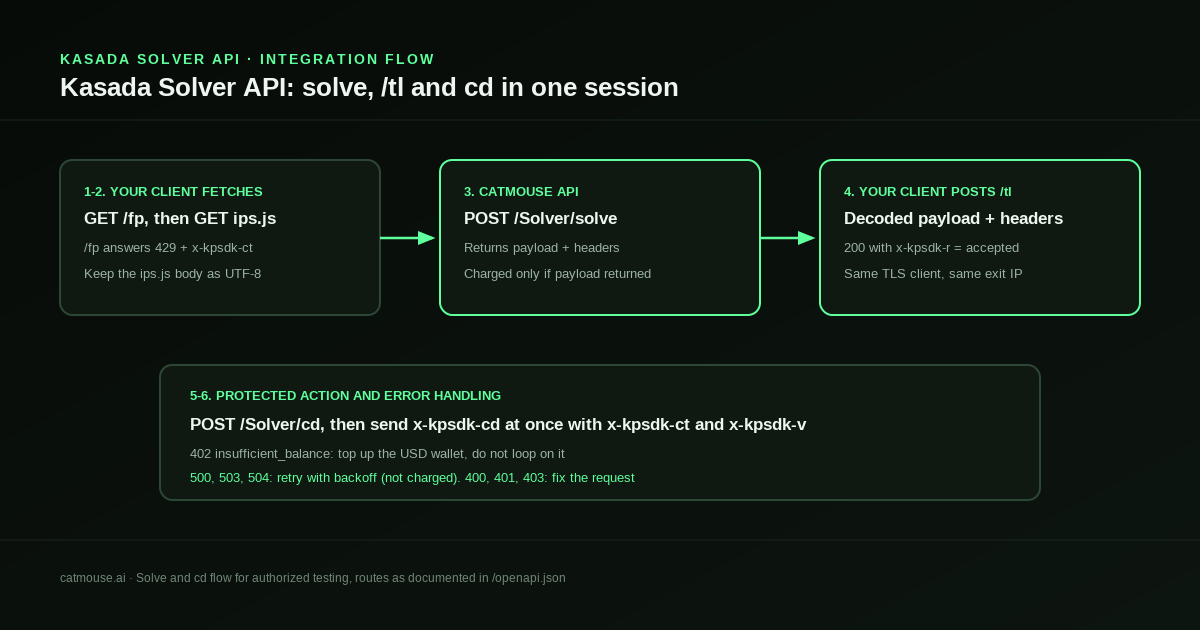
Where does the session ct come from?
The session x-kpsdk-ct comes from the target's own /tl response, not from the Catmouse API. Read it from that response and keep it for the cd call.
You keep it in the same session object as your cookie jar, so the cd call and the protected request send the same value. Compared with the ct you read from /fp, the /tl value is the newer one, so you should overwrite the old copy.
How to call the Kasada solver API with curl
Use curl to verify the API half of the flow before you write client code. The script checks the balance with GET /Solver/getBalance, posts a saved ips.js to POST /Solver/solve, decodes the payload to a file, and requests an x-kpsdk-cd value from POST /Solver/cd.
#!/usr/bin/env bash
# Needs curl, jq and base64. CATMOUSE_KEY holds your API key.
# CT, IPS_URL and KPSDK_V come from your own /fp and ips.js requests (steps 1 and 2).
# ips.js is the saved body of the challenge script, SESSION_CT is the ct your /tl call returned.
set -euo pipefail
API=https://kasadaapi.catmouse.ai

# 0. Preflight: spendable USD balance and the key's per-solve price
curl -sS "$API/Solver/getBalance" -H "x-api-key: $CATMOUSE_KEY" \
  | jq '{balanceUsd, costPerSolveUsd}'

# 3. Solve: jq escapes the ips.js body into valid JSON
jq -n --rawfile ips ips.js --arg ct "$CT" --arg url "$IPS_URL" --arg v "$KPSDK_V" \
  '{ipsBody: $ips, ipsUrl: $url, ctToken: $ct, kpsdkV: $v,
    tz: "America/New_York", tzOffset: 240, acceptLanguage: "en-US", engine: "chrome"}' \
  > solve-request.json

STATUS=$(curl -sS "$API/Solver/solve" \
  -H "x-api-key: $CATMOUSE_KEY" -H "content-type: application/json" \
  --data-binary @solve-request.json -o solve-response.json -w '%{http_code}')
echo "solve HTTP $STATUS"
jq -r '.payload' solve-response.json | base64 -d > tl-body.bin   # raw /tl request body
jq '.headers' solve-response.json                                 # x-kpsdk-* headers for /tl

# 5. Protected action: request cd immediately before the protected request
jq -n --arg ct "$SESSION_CT" '{host: "www.example.com", platform: "web", ct: $ct}' > cd-request.json
curl -sS "$API/Solver/cd" \
  -H "x-api-key: $CATMOUSE_KEY" -H "content-type: application/json" \
  --data-binary @cd-request.json \
  | jq -r '.cd'
The script covers only the calls to the Catmouse API. Steps 1, 2, 4 and 6 hit the target, so run them with the TLS client described in the next section. The tz and tzOffset values in the sample are placeholders: derive them from the proxy exit IP for every session instead of copying them.
How to use the Kasada solver API with curl_cffi in Python
Pair the solver with a TLS-impersonating client such as curl_cffi, because the API never contacts the target and your client's TLS and HTTP/2 fingerprint is what the target sees. Keep one session and one exit IP for /fp, ips.js, /tl and the protected request.
The sample uses curl_cffi's impersonate option for the target and plain requests for the Catmouse API. Other clients such as tls-client follow the same six steps. The curl_cffi and tls-client integration article covers session setup in more depth.
import base64
import os
import random
import re
import time
from urllib.parse import parse_qs, urljoin, urlparse

import requests
from curl_cffi import requests as cffi

API = "https://kasadaapi.catmouse.ai"
SOLVE_PATH = "/Solver/solve"
CD_PATH = "/Solver/cd"
KEY = os.environ["CATMOUSE_KEY"]
PROXY = os.environ["EGRESS_PROXY"]  # one exit IP for every step of a session
HOST = "www.example.com"
FP_URL = os.environ["FP_URL"]  # the challenge /fp URL you observed
TL_URL = os.environ["TL_URL"]  # the site's /tl URL you observed
PROTECTED_URL = os.environ["PROTECTED_URL"]


class OutOfBalance(Exception):
    pass


def api_post(path, body, retry_on=(500, 503, 504), tries=4):
    """POST to the Catmouse API. /Solver/solve documents 500, 503 and 504 as not charged.
    For /Solver/cd pass retry_on=(503,) and rely on its Retry-After header."""
    for attempt in range(tries):
        res = requests.post(API + path, headers={"x-api-key": KEY}, json=body, timeout=60)
        if res.status_code == 402:
            raise OutOfBalance("insufficient_balance: top up the USD balance")
        if res.status_code in retry_on:
            wait = res.headers.get("Retry-After", "")
            delay = float(wait) if wait.isdigit() else min(2 ** attempt, 8) + random.random()
            time.sleep(delay)
            continue
        return res
    return res


def as_json(res, what):
    try:
        return res.json()
    except ValueError:
        # a load balancer 503 or a framework error is not the API's JSON shape
        raise RuntimeError("%s: HTTP %d, body is not JSON" % (what, res.status_code))


def run(tz, tz_offset):
    # tz and tz_offset must describe the proxy exit IP (see the lookup in the OpenAPI description)
    s = cffi.Session(impersonate="chrome", proxies={"http": PROXY, "https": PROXY})

    fp = s.get(FP_URL)                                   # step 1
    assert fp.status_code == 429, fp.status_code
    ct = fp.headers["x-kpsdk-ct"]

    match = re.search(r'src="([^"]*ips\.js[^"]*)"', fp.text)  # adapt to the markup you captured
    ips_url = urljoin(FP_URL, match.group(1))
    ips = s.get(ips_url)                                 # step 2
    assert ips.status_code == 200, ips.status_code
    kpsdk_v = parse_qs(urlparse(ips_url).query).get("x-kpsdk-v", [""])[0]

    solve = as_json(api_post(SOLVE_PATH, {            # step 3
        "ipsBody": ips.text, "ipsUrl": ips_url, "ctToken": ct, "kpsdkV": kpsdk_v,
        "tz": tz, "tzOffset": tz_offset, "acceptLanguage": "en-US", "engine": "chrome",
    }), "solve")
    if not solve.get("success"):
        raise RuntimeError("solve refused: %s" % solve.get("error"))

    tl = s.post(TL_URL, data=base64.b64decode(solve["payload"]), headers=solve["headers"])  # step 4
    if tl.status_code != 200 or "x-kpsdk-r" not in tl.headers:
        raise RuntimeError("tl not accepted: HTTP %d" % tl.status_code)
    session_ct = tl.headers.get("x-kpsdk-ct")
    if not session_ct:
        raise RuntimeError("tl response has no x-kpsdk-ct")

    cd = as_json(api_post(CD_PATH, {"host": HOST, "platform": "web", "ct": session_ct},
                          retry_on=(503,)), "cd")        # step 5
    if not cd.get("success"):
        raise RuntimeError("cd refused: %s" % cd.get("error"))

    return s.post(PROTECTED_URL, json={}, headers={      # step 6, sent immediately
        "x-kpsdk-ct": session_ct,
        "x-kpsdk-cd": cd["cd"],
    })
Three details matter. The ips.js pattern is a starting point and must match the markup you captured. The protected request carries only the session x-kpsdk-ct and the cd value, because those are the two headers the public reference and the cd article name. If the target also expects other headers, copy them from a browser capture of the same site. The sample raises on any refusal instead of sending a half-built request.
How to use the Kasada solver API from Node
Node 18 or later can call both endpoints with built-in fetch and no dependencies. The sample wraps POST /Solver/solve and POST /Solver/cd with a retry policy, throws on HTTP 402, and caps in-flight API calls with a small limiter set by MAX_INFLIGHT.
Save the sample as solve.mjs, because it uses top-level await and export.
const API = "https://kasadaapi.catmouse.ai";
const KEY = process.env.CATMOUSE_KEY;
const sleep = (ms) => new Promise((resolve) => setTimeout(resolve, ms));

export class OutOfBalance extends Error {}

// Bounded concurrency: at most `max` API calls in flight from this process.
function limiter(max) {
  let active = 0;
  const queue = [];
  const next = () => {
    if (active >= max || queue.length === 0) return;
    active++;
    const { fn, resolve, reject } = queue.shift();
    fn().then(resolve, reject).finally(() => { active--; next(); });
  };
  return (fn) => new Promise((resolve, reject) => { queue.push({ fn, resolve, reject }); next(); });
}
const limit = limiter(Number(process.env.MAX_INFLIGHT ?? 4));

// /Solver/solve documents 500, 503 and 504 as not charged. For /Solver/cd pass retryOn = [503].
async function post(path, body, retryOn = [500, 503, 504], tries = 4) {
  for (let attempt = 0; attempt < tries; attempt++) {
    const res = await fetch(API + path, {
      method: "POST",
      headers: { "x-api-key": KEY, "content-type": "application/json" },
      body: JSON.stringify(body),
    });
    if (res.status === 402) throw new OutOfBalance("insufficient_balance: top up the USD balance");
    if (retryOn.includes(res.status)) {
      const retryAfter = Number(res.headers.get("retry-after"));
      await sleep(retryAfter > 0 ? retryAfter * 1000 : Math.min(2 ** attempt * 1000, 8000) + Math.random() * 500);
      continue;
    }
    return { status: res.status, body: await res.json().catch(() => null) };
  }
  throw new Error(`${path}: retries exhausted`);
}

export const solve = (request) => limit(() => post("/Solver/solve", request));
export const cd = (host, ct) => limit(() => post("/Solver/cd", { host, platform: "web", ct }, [503]));

// Preflight before a batch.
const balance = await (await fetch(`${API}/Solver/getBalance`, { headers: { "x-api-key": KEY } })).json();
console.log({ balanceUsd: balance.balanceUsd, costPerSolveUsd: balance.costPerSolveUsd });

// One cd per protected request, requested right before that request is sent.
const { body } = await cd("www.example.com", process.env.SESSION_CT);
if (!body?.success) throw new Error(`cd refused: ${body?.error}`);
console.log("x-kpsdk-cd:", body.cd);
The module covers the API calls only. For the requests to the target, choose a client that gives you control over the TLS fingerprint, and keep the same exit IP across the whole session.
How USD prepaid billing and HTTP 402 work
Every call is charged to a prepaid USD balance on the key. A solve is charged only when a payload is returned, at the key's per-service price. When the balance is used up the API answers HTTP 402 with insufficient_balance, and the reference states this is not a rate limit.
| Event | HTTP status | Charged | Client action |
|---|---|---|---|
| Solve returns a payload | 200 | Yes, at the key's price. The platform default is 0.003 USD per solve unless the key has an override, and the response cost field shows the amount | Log cost and continue |
| Solve refused or failed | 400, 422, 500, 503, 504 | No | Fix the request or retry, see the error table |
| cd generated | 200 | The OpenAPI description says the cd service is charged to the USD balance at the cd price | Read rates.cd from GET /key/status to see your price |
| Balance used up | 402 with insufficient_balance | Not applicable, the request is refused | Stop the worker, top up, then resume |
RFC 9110 reserves status 402 for future use, so a client should key on the JSON error code insufficient_balance instead of the status number alone.
- Preflight a batch.
GET /Solver/getBalancereturnsbalanceUsd,balanceMicroUsdandcostPerSolveUsd. Compare the balance with the cost of the planned run before you start. - Track spend.
GET /key/statusadds per-service rates and usage counts, andGET /key/metricsreturns your own usage time series. - Trial and top-up. New keys start with a $2.00 USD wallet and no card. The pricing page lists the top-up methods, and the reference documents the billing routes.
Is a failed solve charged?
No. A solve is charged only when a payload is returned, and the OpenAPI file documents 500, 503 and 504 on /Solver/solve as not charged.
According to the OpenAPI file, a 402 refuses the request instead of charging it. You should therefore treat a 402 versus a 5xx differently: a 5xx is worth a retry, whereas a 402 is not until you top up.
Which Kasada solver API errors are safe to retry
Retry 500, 503 and 504 from POST /Solver/solve, which the OpenAPI file documents as not charged, and honor Retry-After. On POST /Solver/cd retry only the 503 with Retry-After. Never retry 400, 401, 402 or 403 unchanged.
On 422, fetch a fresh ips.js and solve again at most once before treating the target as not solvable for now.
| HTTP | Error | Meaning | Client action |
|---|---|---|---|
400 | empty ipsBody, invalid ipsBody, missing geo, truncated ips body | The request is malformed or incomplete | Fix the request. missing geo means tz and tzOffset are absent |
401 | api_key_missing, api_key_invalid | No key or an unknown key | Check the x-api-key header |
402 | insufficient_balance | The USD balance is used up | Top up, do not loop |
403 | api_key_disabled, api_key_expired, service_not_enabled | The key cannot use this service | Contact support, do not retry |
413, 415 | Plain-text framework errors | Body over 16 MiB, or missing content-type: application/json | Fix the request |
422 | Free-form text such as script parse error | The ips.js body could not be solved | Re-fetch the current script and solve once more |
500, 504 | solver task panicked, solve timed out | Server-side failure. Not charged on /Solver/solve | Retry with backoff |
503 | max_concurrent_requests_exceeded, solver queue full | The fleet is shedding load. Not charged on /Solver/solve | Back off and retry, lower your concurrency |
503 on cd | pjs_warming | The host's script is warming | Retry after the Retry-After: 2 header |
422 on cd | pjs_host_unwarmed | The host is not kept warm | Send the site's /p.js source as pscript |
A 200 from the solver followed by an empty /tl answer without x-kpsdk-r is the site declining the payload, so it is not an API status. The reference lists the usual causes as an egress IP that does not match the site geography and a stale served version.
Should you retry a 402?
No. A 402 means the USD balance is used up, so a retry fails the same way until you top up.
Do not trust a loop that keeps retrying on 402, because every worker in your pool hits the same wall. However, you can resume the pool as soon as your balance check shows enough USD for the next solves.
Retry, concurrency and session rules for production
Use exponential backoff with jitter, cap the attempts, and bound in-flight calls with a semaphore. The reference says no per-key request-rate throttle exists, yet the fleet sheds load with 503, so raise concurrency only while the 503 rate stays at zero.
- Backoff: start small, double per attempt, add random jitter, and prefer the server's
Retry-Aftervalue (RFC 9110, Retry-After) when one is sent. - Safe retries: POST is not idempotent in HTTP terms (RFC 9110, idempotent methods), but the OpenAPI file documents 500, 503 and 504 on
/Solver/solveas not charged, so a retry there cannot double-bill. It states no such rule for/Solver/cd, so retry cd only on the 503 that carries Retry-After. - One session per worker: a session owns its cookie jar, its exit IP, its TLS client and its
x-kpsdk-ct. Never share these across workers. - cd on demand: request
x-kpsdk-cdright before each protected request. Never build a queue of precomputed values. - Stop on 402: a worker that gets
insufficient_balanceshould pause the whole pool, because every other worker will hit the same wall. - The 429 on /fp is the challenge: the site's
/fpanswers429by design in the documented flow (RFC 6585 defines the status), so do not back off from it as if it were a rate limit.
Conclusion and Architecture Recommendations
Treat the solver as a stateless HTTP function inside a per-session worker. Your client owns the network path to the target, the API turns an ips.js body into a /tl payload and headers, and a USD wallet check plus a bounded retry policy keeps a batch from stalling.
- Run one worker per session, with its own TLS client, cookie jar and proxy exit IP.
- Derive
tzandtzOffsetfrom that exit IP on every session. - Preflight the balance, log
coston every solve, and stop the pool on the firstinsufficient_balance. - Retry 500, 503 and 504 on solve, retry only the 503 with
Retry-Afteron cd, and honorRetry-After. - Request
x-kpsdk-cdimmediately before each protected request.
Scope and limits. The Catmouse solver targets one vendor, Kasada, and the API contract does not promise a pass rate. Use it only on systems you own or are authorized to test. Next steps: request a trial key, read the API reference, and compare plans on the pricing page. For background on the challenge itself, read How to Bypass Kasada in 2026.
Evidence and sources
The routes, fields, status codes and prices in this article trace to the primary sources below, and the HTTP statements trace to the IETF documents. Each source lists what it supports and the date it was reviewed.
- Catmouse OpenAPI 3.1 file (
/openapi.json). Supports: solve and cd request and response fields, error codes, the 0.003 USD platform default price, billing rules, the 16 MiB body limit. Reviewed 2026-11-13. - Catmouse API reference. Supports: the six-step flow, the roughly 10 second re-probe, the statement that 402 is not a rate limit and that no per-key request-rate throttle exists, 503 guidance. Reviewed 2026-11-13.
- Catmouse pricing. Supports: the $2.00 starting USD wallet with no card. Reviewed 2026-11-13.
- IETF RFC 9110 (HTTP Semantics). Supports: 402 reserved status, Retry-After, idempotent methods.
- IETF RFC 6585 and IETF RFC 4648. Supports: the 429 status definition and base64 encoding.
- Kasada (vendor site, linked for context only).
Methodology and limits. Derived from the Catmouse OpenAPI file and reference page as published. No performance or pass-rate figures are claimed, and results depend on site configuration.
Frequently asked questions
These answers repeat the facts above for readers who want the short version. Each answer maps to the Catmouse OpenAPI file or the API reference, so check those two sources if a field or status code has changed since the review date.
What does a Kasada solver API return?
POST /Solver/solve returns a base64 payload that decodes to the /tl request body, a headers object with x-kpsdk-ct, x-kpsdk-dt, x-kpsdk-im and x-kpsdk-v, and a cost field. It returns no cookies. POST /Solver/cd returns one x-kpsdk-cd value.
Which headers go on the protected request?
Send the session x-kpsdk-ct from the /tl response and the x-kpsdk-cd string from POST /Solver/cd verbatim. Request the cd value immediately before sending, because it is generated per protected request. If the target also expects other headers, copy them from a browser capture of the same site.
What does HTTP 402 insufficient_balance mean?
The USD balance on the key is used up. The reference states it is not a rate limit. Top up the balance through the billing routes or the dashboard, and stop retrying until the balance is positive.
Which errors are safe to retry?
Retry 500, 503 and 504 from POST /Solver/solve with exponential backoff and jitter, since the OpenAPI file documents them as not charged, and honor Retry-After when present. On POST /Solver/cd retry only the 503 that carries Retry-After. Fix the request on 400, 401 and 403. On 422, re-fetch ips.js and solve again once.
Do I need a TLS client such as curl_cffi?
Yes for the requests to the target. The API never contacts the target, so your own client and exit IP make the /fp, ips.js, /tl and protected calls. A TLS-impersonating client such as curl_cffi or tls-client gives you control of that fingerprint.