Integrating Kasada Solver APIs with curl_cffi and tls-client
Pairing the Catmouse HTTP solver (POST /Solver/solve) with a browser-impersonating transport library such as Python curl_cffi or Go tls-client keeps your TLS JA4, HTTP/2 SETTINGS, cookie jar, and sticky proxy exit IP coherent across the entire challenge lifecycle. Below: how to structure the session pool and manage your universal USD wallet balance.
Who this is for
Backend and automation engineers building high-concurrency Python, Go, or Node.js HTTP pipelines who want to integrate the Catmouse solver and universal USD wallet without running headless browsers.
On this page
- Why do curl_cffi and tls-client matter when using an HTTP solver?
- What is the four-step session flow for solving Kasada over HTTP?
- How do you wire SolveRequest in Python?
- How do you monitor your universal USD wallet and charge leases?
- Key takeaways
- Conclusion and scope
- Evidence and sources
- Frequently asked questions
Why do curl_cffi and tls-client matter when using an HTTP solver?
Transport impersonation is a technique that aligns the client TLS handshake and HTTP/2 framing with the browser profile inside the solved telemetry payload.
When you send a fetched ips.js script to the solver endpoint, the backend evaluates the virtualized bytecode under a trusted device profile selected by the engine field (chrome, wkw, snkrs, fl, whatnot-ios, or android). However, your own HTTP client is responsible for fetching ips.js, posting the returned /tl body to the target origin, and sending subsequent API requests. Using a transport library that impersonates the matching TLS and HTTP/2 stack prevents transport-to-payload mismatches (RFC 9113):
curl_cffi(Python binding forcurl-impersonate)- The
curl_cffilibrary is a Python wrapper that configures BoringSSL cipher suites, ALPN extension order, HTTP/2SETTINGSframes, and pseudo-header order (:method,:authority,:scheme,:path) to match Chromium or Safari builds. tls-client(Go / Node.jsuTLSwrapper)- The
tls-clientpackage is a programmable transport client that exposes custom TLS ClientHello specs and persistent connection pools per sticky proxy session soips.js,/tl, and protected POSTs reuse the same H2 connection. - Direct solver connection versus proxied target connection
- Always call
https://kasadaapi.catmouse.aidirectly from your worker without a proxy to minimize round-trip overhead, while in contrast routing all requests to the target origin through a pinned sticky residential proxy exit.
What is the four-step session flow for solving Kasada over HTTP?
A complete session fetches the challenge script over a sticky proxy, calls the solve endpoint, submits telemetry to capture a session token, and mints proof-of-work values.
Comparing direct solver calls versus proxied target requests
The table below compares each step of the HTTP integration across destination host, proxy requirement, and key inputs:
| Step | Target Destination | Proxy Routing | Key Inputs & Outputs |
|---|---|---|---|
| 1. Fetch challenge script | Target origin GET /<path>/ips.js | Sticky residential proxy exit | Captures UTF-8 ipsBody and initial cookies (KP_UIDz) |
| 2. Solve telemetry | Catmouse SolveRequest endpoint | Direct (no proxy) | Sends ipsUrl, ipsBody, tz, tzOffset, engine; returns payload |
3. Submit /tl | Target origin POST /<path>/tl | Same sticky proxy & H2 session | Sends decoded payload; captures refreshed x-kpsdk-ct token |
4. Mint x-kpsdk-cd | Catmouse CdRequest endpoint | Direct (no proxy) | Sends host, platform, ct (and optional pscript); returns fresh x-kpsdk-cd |
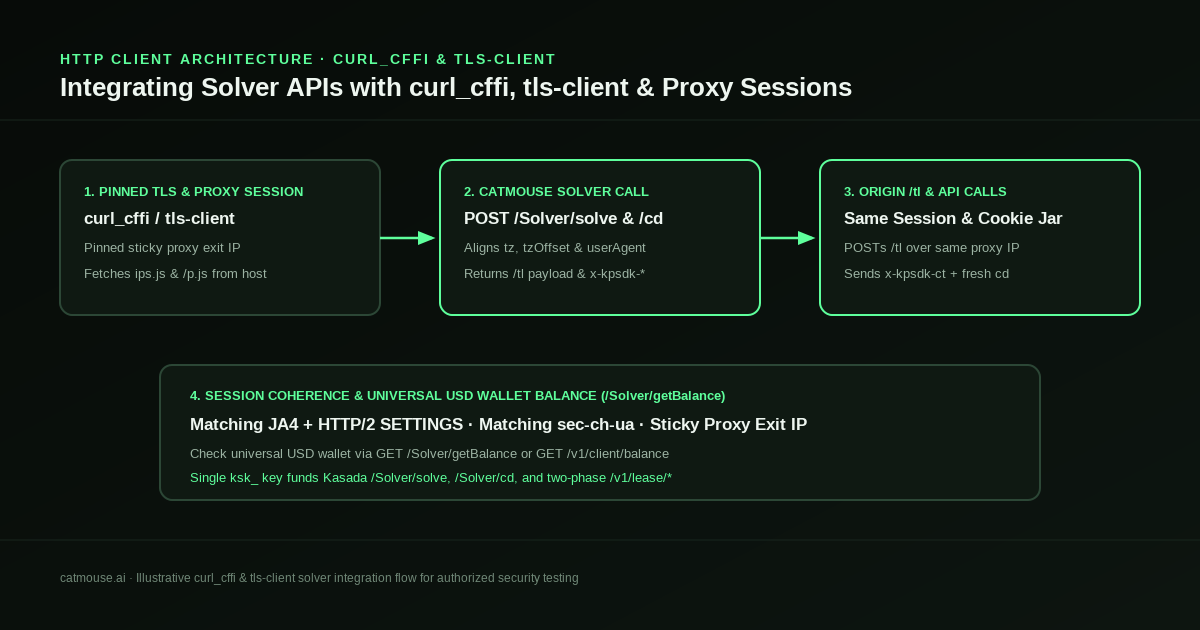
curl_cffi or tls-client proxy session with the Catmouse HTTP solver. Diagram by Catmouse Engineering.How do you wire SolveRequest in Python?
Send the fetched script body and proxy timezone to the solve endpoint, then decode the returned payload into raw bytes before posting to the target telemetry path.
Constructing the SolveRequest JSON payload and decoding base64 bytes
The Python example below uses the exact field names defined in the Catmouse OpenAPI 3.1 specification (/openapi.json) to solve an ips.js challenge:
import os
import requests

solve_res = requests.post(
    "https://kasadaapi.catmouse.ai/Solver/solve",
    headers={"x-api-key": os.environ["CATMOUSE_KEY"]},
    json={
        "ipsUrl": "https://www.example.com/149e9513-01fa-4fb0-aad4-566afd725d1b/2d206a39-8ed7-437e-a3be-862e0f06eea3/ips.js",
        "ipsBody": "<UTF-8 source of ips.js fetched from target>",
        "tz": "America/Chicago",
        "tzOffset": 360,
        "engine": "chrome",
        "userAgent": "Mozilla/5.0 (Windows NT 10.0; Win64; x64) AppleWebKit/537.36 (KHTML, like Gecko) Chrome/145.0.0.0 Safari/537.36",
    },
    timeout=25,
)
print(solve_res.status_code, solve_res.text)
How do you monitor your universal USD wallet and charge leases?
Query your wallet balance endpoint to inspect your spendable USD balance, micro-USD accounting, and the per-service prices.
Every newly provisioned wallet key operates on a unified micro-USD balance rather than isolated solve counters. Your workers can check remaining capacity before launching a batch job and rely on the trusted two-phase reserve/commit/refund charge model so failed upstream requests never spend wallet funds.
Key takeaways
- Keep target traffic on one sticky proxy session: Fetch
ips.js, POST/tl, and call protected endpoints over the same proxy exit IP and HTTP/2 connection. - Call
kasadaapi.catmouse.aidirectly: Do not route solver API requests through your residential proxy pool. - Check
SolveResponse.encoding: Base64-decodepayloadinto raw bytes whenencodingis"base64"before posting to/tl. - Monitor spend via your USD wallet fields: Read
balanceUsdandbalanceMicroUsdto trigger automated crypto top-ups before a batch exhausts its balance.
Conclusion and scope
Combining a browser-grade TLS/HTTP2 client with the Catmouse HTTP solver gives your workers deterministic control over every cookie and timezone parameter without the memory overhead of headless browser instances.
Scope and limitations. All request and response schemas (SolveRequest, SolveResponse, CdRequest, CdResponse) are verified against the Catmouse OpenAPI 3.1 specification (/openapi.json) as of 2026-11-03. Use these techniques only on systems you own or have explicit written authorization to test.
Evidence and sources
The API contracts and transport specifications referenced in this guide are backed by the primary sources below:
- Catmouse OpenAPI 3.1 specification (
/openapi.json) and API reference (/reference.html). Supports:SolveRequest,SolveResponse(encoding,payload), andCdRequestschemas. Reviewed 2026-11-03. - IETF RFC 9113 (HTTP/2) and IETF RFC 8446 (TLS 1.3). Supports: HTTP/2
SETTINGSframe ordering, pseudo-headers, and TLS ClientHello negotiation. - IETF RFC 4648 (Base64 Encodings), MDN Set-Cookie documentation, and W3C High Resolution Time Level 3. Supports: decoding base64-encoded binary
/tltelemetry payloads and preserving cookie and timing state.
Methodology and limits. Code samples are validated against tools/validate-samples.mjs and /openapi.json. No throughput or pass-rate benchmarks are claimed. Reviewed 2026-11-03.
Frequently asked questions
Why should you use curl_cffi or tls-client when calling a Kasada-protected origin?
Default language HTTP libraries emit distinct TLS JA4 and HTTP/2 SETTINGS fingerprints. Browser-impersonating libraries like curl_cffi and tls-client align the transport fingerprint with the User-Agent and engine profile solved by the Catmouse solve endpoint.
Should the Catmouse API call itself go through your residential proxy?
No. Call https://kasadaapi.catmouse.ai directly from your server over a fast connection, and use your sticky residential proxy session only for traffic to the target origin (fetching ips.js, posting /tl, and calling protected APIs).
How do you decode and send the /tl payload returned by the solve endpoint?
When SolveResponse.encoding is "base64" (for example on chrome), base64-decode the payload string into raw bytes and POST it to the target's /tl endpoint with Content-Type: application/octet-stream alongside the returned x-kpsdk-ct, x-kpsdk-dt, and x-kpsdk-v response fields.
How do you check your universal USD wallet balance from Python or Go?
Query the Catmouse balance endpoint with your x-api-key credential to read balanceUsd, balanceMicroUsd and unlimited.
What should your client do if the target returns HTTP 429 on a protected request?
Inspect the 429 response body or response fields for a fresh ips.js script URL, fetch the new ips.js over the same sticky proxy session, solve it via the solve endpoint, POST the new /tl payload, and retry the request with a fresh x-kpsdk-cd value.