Kasada Mobile SDKs: iOS WKWebView (i-) and Android (a-) Telemetry vs Web ips.js
A Kasada mobile SDK profile is a device telemetry configuration that pairs an embedded WebView or native mobile bootstrap with platform-specific headers (x-kpsdk-v prefixed with i- or a-, plus fc, h, and dv). Below: how web, iOS WKWebView (wkw), native iOS, and Android profiles route in POST /Solver/solve.
Who this is for
Security researchers and mobile protocol engineers auditing iOS and Android applications protected by Kasada who need to select the correct engine, kpsdkV, and mobile header fields in POST /Solver/solve.
On this page
- How do Kasada mobile SDK profiles differ from web ips.js?
- How does the kpsdkV prefix route requests in the Solver API?
- Which request fields and headers apply to native iOS and Android solves?
- How does platform selection work on POST /Solver/cd for mobile targets?
- Key takeaways
- Conclusion and scope
- Evidence and sources
- Frequently asked questions
How do Kasada mobile SDK profiles differ from web ips.js?
Kasada mobile SDKs package native hardware, operating system, and application metadata alongside challenge telemetry, whereas browser scripts collect web DOM and window signals.
When a desktop or mobile browser loads a Kasada challenge over a trusted TLS session, the client executes a web ips.js script whose x-kpsdk-v query parameter starts with j- or v-. Mobile applications, by contrast, integrate Kasada in one of two ways: either by hosting an embedded iOS WKWebView container for web authentication flows (such as OAuth login pages) or by embedding the native iOS (i-) or Android (a-) SDK directly into the mobile binary.
In contrast to a desktop Chrome session, native mobile SDK integrations bootstrap additional challenge metadata from a mobile configuration route (/mfc) and attach hardware model identifiers, OS versions, and application bundle identifiers to the solve request.
How do the six engine profiles in POST /Solver/solve map to device classes?
As specified in the Catmouse OpenAPI 3.1 contract, the engine field on SolveRequest is a case-insensitive Kasada device-profile selector (never a multi-vendor switch):
chrome(Default Web Profile)- Desktop and standard web browser profile paired with
j-orv-SDK versions. Unrecognizedenginestrings fall back tochromeunless overridden by thekpsdkVprefix. wkw(iOS WKWebView Profile)- Models an embedded Apple
WKWebViewcontainer used by mobile sign-in and account flows. Accepted aliases includeaccounts-wkw,accounts-wkwebview, andwkwebview. snkrs,fl, andwhatnot-ios(Native iOS Profiles)- Native iOS SDK device profiles tailored to specific mobile application families:
snkrs(aliasessnkrs-ios,ios-snkrs,ios),fl(aliasesfl-ios,footsites,footsites-ios), andwhatnot-ios(aliaseswhatnot_ios,ios-whatnot,whatnot-native). android(Native Android Profile)- Native Android SDK profile paired with
a-version strings. Accepted aliases includewhatnot,chipotle, andandroid-webview.
How does the kpsdkV prefix route requests in the Solver API?
The version prefix in kpsdkV acts as the authoritative family selector and overrides any conflicting browser or mobile engine label sent by the caller.
One of the most helpful safeguards documented in /openapi.json is prefix authority on kpsdkV. If a client leaves "engine": "chrome" at its default value but passes a kpsdkV string beginning with i- (native iOS) or a- (Android), the solver automatically routes the request to the matching mobile SDK family. Similarly, if the caller sends a userAgent string that is incoherent for the selected engine, the server replaces it with the coherent engine default.
Comparing Web, iOS WKWebView, Native iOS, versus Native Android telemetry
The table below summarizes how version prefixes, request fields, and response headers differ across the four Kasada runtime environments:
| Dimension | Web Browser (chrome) | iOS WKWebView (wkw) | Native iOS (snkrs, fl, whatnot-ios) | Native Android (android) |
|---|---|---|---|---|
kpsdkV prefix | j- or v- | j- or v- (or iOS WebView) | i- | a- |
/mfc bootstrap headers | Not used | Not used | fcHeader (x-kpsdk-fc), hHeader (x-kpsdk-h) | fcHeader (x-kpsdk-fc), hHeader (x-kpsdk-h) |
| Device verification field | Not used | Not used | kpsdkDv (or built from appVersion + appId) | dvHeader (x-kpsdk-dv) |
| Hardware & app metadata | pageOrigin, pageUrl, cfBeacon | iOS WebKit UA + viewport | deviceCode, osVersion, appVersion, appId | androidAppVersion, appId |
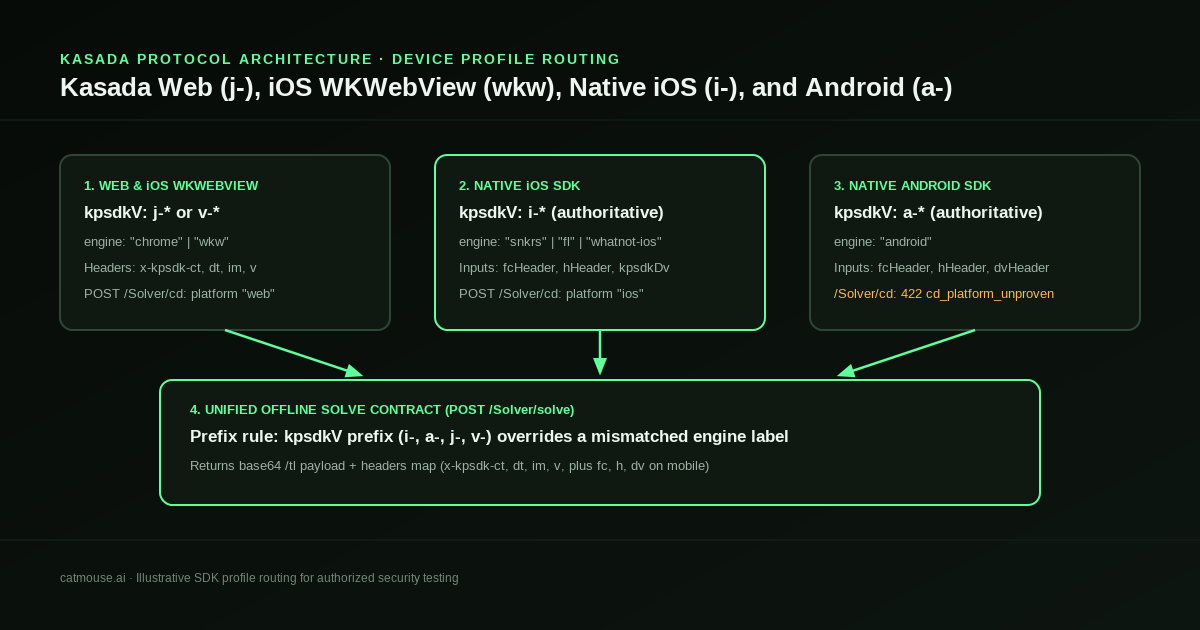
j-), iOS WKWebView (wkw), native iOS (i-), and Android (a-) solves through POST /Solver/solve. Diagram by Catmouse Engineering.Which request fields and headers apply to native iOS and Android solves?
Native iOS and Android solves accept optional hardware, application, and mobile-bootstrap fields alongside the required ipsBody, tz, and tzOffset parameters.
The Python example below demonstrates calling POST https://kasadaapi.catmouse.ai/Solver/solve for a mobile profile while supplying the proxy exit timezone and per-account sessionId:
import os
import requests

r = requests.post(
    "https://kasadaapi.catmouse.ai/Solver/solve",
    headers={"x-api-key": os.environ["CATMOUSE_KEY"]},
    json={
        "ipsBody": "<contents of the ips.js response, as UTF-8 text>",
        "ipsUrl": "https://www.example.com/149e9513-01fa-4fb0-aad4-566afd725d1b/2d206a39-8ed7-437e-a3be-862e0f06eea3/ips.js?x-kpsdk-v=j-1.2.899&x-kpsdk-im=ZXhhbXBsZQ",
        "ctToken": "<x-kpsdk-ct response header of the /fp request>",
        "kpsdkV": "j-1.2.899",
        "tz": "America/New_York",
        "tzOffset": 240,
        "acceptLanguage": "en-US",
        "engine": "wkw",
        "sessionId": "account-device-seed-01",
    },
    timeout=60,
)
print(r.status_code, r.text)
When working with native iOS (snkrs, fl, whatnot-ios) or Android (android) targets, keep three field rules from /openapi.json in mind:
- Keep
sessionIdstable per account: Pass the same opaque string insessionId(aliasdeviceSeed) for every solve belonging to one account, and a distinct string per account. Never passx-kpsdk-ctassessionId. - Pass
/mfcand device-verification headers when present: On native SDK flows that issuex-kpsdk-fcandx-kpsdk-hfrom/mfc, include them asfcHeaderandhHeader, and providekpsdkDv(ordeviceCode,osVersion,appVersion, andappId) on iOS ordvHeaderandandroidAppVersionon Android. - Forward all returned
headersonPOST /tl: TheSolveResponsereturns aheadersmap containingx-kpsdk-ct,x-kpsdk-dt,x-kpsdk-im, andx-kpsdk-v, plusfcHeader,hHeader, anddvHeaderwhen applicable.
How does platform selection work on POST /Solver/cd for mobile targets?
After your client completes the /tl handshake and receives a refreshed x-kpsdk-ct session token, protected API routes require a fresh x-kpsdk-cd header from POST /Solver/cd.
In the CdRequest schema of /openapi.json, the required platform enum accepts two values: "web" and "ios". When "platform": "ios" is sent, you can also pass the served kpsdkVersion string so the server selects the matching iOS timing band. Conversely, sending "platform": "android" to POST /Solver/cd is explicitly refused with HTTP 422 Unprocessable Content (RFC 9110) and error code cd_platform_unproven rather than returning an unverified header shape.
Key takeaways
engineselects a Kasada device profile: Choosechromefor web,wkwfor iOSWKWebViewauth flows,snkrs/fl/whatnot-iosfor native iOS, andandroidfor native Android.kpsdkVprefix is authoritative: A version prefix ofi-(native iOS),a-(Android), orj-/v-(web) overrides a conflictingenginelabel.- Pin
sessionIdper account: Reuse one opaquesessionId(deviceSeed) across solves for the same user account and never populate it withx-kpsdk-ct. - Check
POST /Solver/cdplatform support:CdRequestsupportsplatform: "web"andplatform: "ios", and refuses"android"with HTTP422 cd_platform_unproven.
Conclusion and scope
Following these recommendations for matching engine, kpsdkV, and mobile hardware fields to the target's actual runtime environment ensures your HTTP client emits coherent telemetry across web, WKWebView, and native mobile endpoints.
Scope and limitations. All field names, engine enumerations, prefix rules, and status codes in this article are taken directly from the live Catmouse OpenAPI 3.1 contract (/openapi.json) as of 2026-10-23. No pass-rate, latency, or throughput numbers are claimed. Use these protocol references only on systems you own or have explicit written authorization to test.
Evidence and sources
Every endpoint parameter, engine alias, and HTTP status code referenced in this guide is backed by the primary sources below:
- Catmouse OpenAPI 3.1 contract (
/openapi.json) alongside the HTTP API reference (/reference.html). Supports:SolveRequestfields (engineenum and aliases,kpsdkVprefix routing,fcHeader,hHeader,dvHeader,kpsdkDv,deviceCode,osVersion,appVersion,appId,androidAppVersion,sessionId) andCdRequestplatformrules (web,ios,422 cd_platform_unproven). Reviewed 2026-10-23. - IETF RFC 9110 (HTTP Semantics) and IANA HTTP Status Code Registry. Supports: HTTP status code semantics including
200 OK,400 Bad Request, and422 Unprocessable Content. - MDN HTTP User-Agent header documentation and W3C Navigation Timing Level 2. Supports: browser and WebView User-Agent and timing telemetry structure.
Methodology and limits. Documented: request and response schemas verified from the production server source and published in /openapi.json. Not claimed: unverified vendor internals or performance benchmarks. Reviewed 2026-10-23.
Frequently asked questions
What engine values does POST /Solver/solve accept for Kasada mobile and web targets?
Per the Catmouse OpenAPI 3.1 specification (/openapi.json), the SolveRequest engine field accepts chrome (default), snkrs, wkw, fl, whatnot-ios, and android, along with documented aliases such as wkwebview, footsites-ios, and android-webview.
What happens if kpsdkV starts with i- or a- while engine is set to chrome?
The prefix of kpsdkV is authoritative for engine routing in POST /Solver/solve: an i- prefix selects native iOS, an a- prefix selects Android, and j- or v- selects web, overriding any conflicting engine label.
What is the difference between the wkw engine and native iOS engines like snkrs or fl?
The wkw engine models an iOS WKWebView login or checkout container running web challenge scripts, whereas snkrs, fl, and whatnot-ios model native iOS app integrations that include /mfc headers (fcHeader, hHeader) and hardware identifiers (deviceCode, osVersion, appVersion, appId).
Which mobile headers are returned when solving a native iOS or Android challenge?
In addition to x-kpsdk-ct, x-kpsdk-dt, x-kpsdk-im, and x-kpsdk-v, native mobile solves can accept and emit fcHeader (x-kpsdk-fc), hHeader (x-kpsdk-h), and dvHeader or kpsdkDv (x-kpsdk-dv) inside the returned headers map.
Does POST /Solver/cd support both iOS and Android platforms?
POST /Solver/cd accepts platform values of web and ios. Sending platform set to android is refused with HTTP 422 and error code cd_platform_unproven, while any other string returns HTTP 400 invalid_platform.