Nike SNKRS Bot Detection: Protocol-Level Guide
Nike SNKRS bot detection work starts with understanding what the protection asks of a client. nike.com sits behind bot-management protection (vendor not re-verified). Use this only for Nike endpoints and data you are authorized to access.
Such systems usually expect the client to run a challenge script and return a token, and a protocol-level client can, where the vendor is Kasada, post the fetched challenge script to a solver API and send the returned request instead of running a browser.
Who this is for
Engineers and data teams who own, or have explicit written authorization to test, Nike SNKRS and want to understand how the bot-management protection on nike.com is described in this post before deciding on an approach.
On this page
- How bot-management challenges work on nike.com
- Why browser automation is costly for read-heavy workloads (Nike SNKRS)
- Example: requesting session credentials from the solver API (Nike SNKRS)
- Collecting sneaker and apparel retail data responsibly
- Scope and limitations
- Evidence and sources
- Frequently asked questions
- Conclusion and next steps
- Who it is for: engineers who are authorized to collect launch calendar and product availability data from nike.com and want to understand the challenge flow.
How bot-management challenges work on nike.com?
For Nike SNKRS, how the challenge and token flow works is the same as for any browser-verified bot management, so it is explained once in the bot-management reference. This section keeps only what is specific to Nike SNKRS.
When a client without a valid session reaches an endpoint behind bot-management protection, it is typically served a challenge instead of the page or API payload. The challenge is a non-200 status plus a script or interstitial the client must complete. The Catmouse targets directory lists one vendor for nike.com while the earlier title of this article named two, and neither label was re-verified, so this guide does not name a vendor and describes nike.com as bot-management protection (vendor not re-verified). Confirm the real vendor with your own capture before using any solver: the Catmouse API covers Kasada only, so if your capture shows no x-kpsdk-* headers, the example below does not apply to nike.com.
- Challenge delivery: the server returns a challenge response and a script or interstitial.
- Verification: the client returns a result, which may include a computed proof or a solved puzzle.
- Credential issue: the server issues a token, cookie or header set that later requests must carry.
Why browser automation is costly for read-heavy workloads (Nike SNKRS)?
A full browser per session is expected to need more memory and CPU than an HTTP client, so scaling a read-heavy job on browsers should raise infrastructure cost. This is a general expectation, not a Catmouse measurement. We have not measured this on nike.com, so no figures are given here.
Anti-bot scripts commonly inspect automation signals such as navigator.webdriver, which the W3C WebDriver specification defines as returning true when the user agent is under remote control. In Catmouse's observation, patches that overwrite those properties can leave traces of their own. Whether a given setup passes on nike.com has to be tested, and the answer can change when the protection is updated.
What a protocol-level client changes
What separates nike snkrs kasada bot protection guide telemetry from plain HTTP replay?
In contrast, on nike snkrs kasada bot protection guide, you must refresh session state whenever a route returns a challenge instead of reusing old headers.
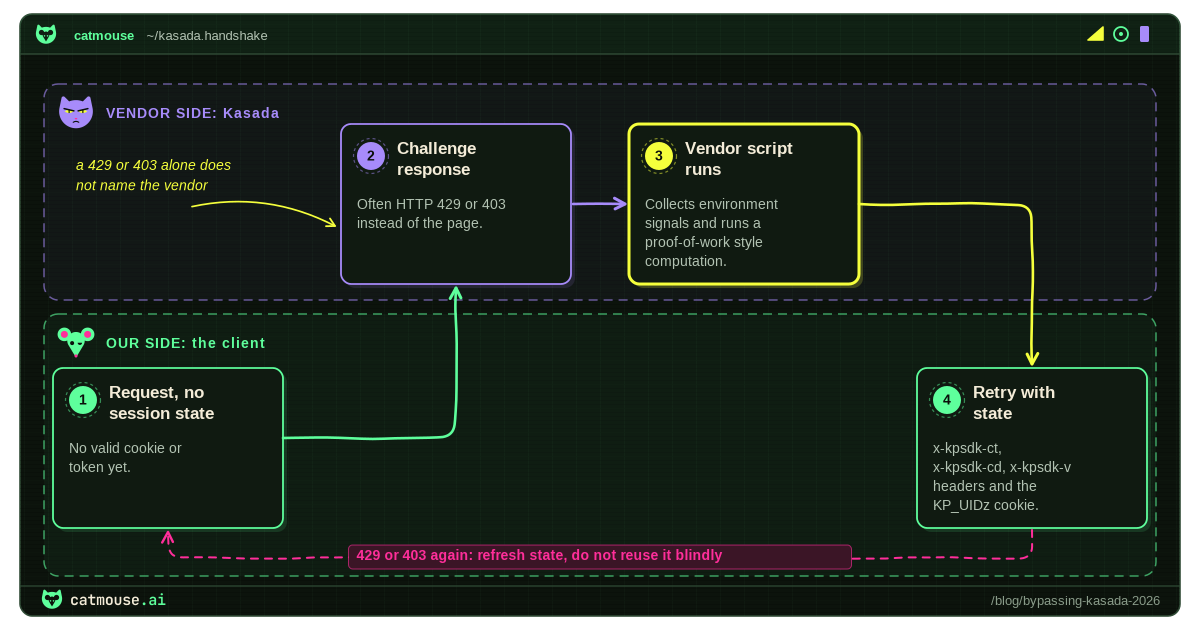
- Challenge bootstrap (nike snkrs kasada bot protection guide)
- The initial HTTP challenge response on nike snkrs kasada bot protection guide that delivers the vendor script or session seed to the client.
- Session state verification (nike snkrs kasada bot protection guide)
- The header or cookie proof returned after telemetry evaluation on nike snkrs kasada bot protection guide that authorizes subsequent API calls.
| Stage | Plain HTTP replay on nike snkrs kasada bot protection guide | Verified session state on nike snkrs kasada bot protection guide |
|---|---|---|
| Initial request | Missing session proof for nike snkrs kasada bot protection guide | Bootstraps fresh challenge state for nike snkrs kasada bot protection guide |
| Protected route | Challenged with HTTP 403 or 429 on nike snkrs kasada bot protection guide | Attaches current session state for nike snkrs kasada bot protection guide |
Example: requesting session credentials from the solver API (Nike SNKRS)
This example applies only if your own capture of nike.com shows Kasada (x-kpsdk-* headers). The solver API does not fetch anything from Nike. Your client, with its own authorized session and egress IP, requests the site's /fp page, reads the x-kpsdk-ct header and the ips.js URL, downloads ips.js, and posts that body to POST /Solver/solve as ipsBody with ipsUrl, ctToken, kpsdkV, tz and tzOffset. The engine field selects a Kasada device profile (chrome here), not a vendor.
import base64, os, requests

# Steps 1-3 run in YOUR client against YOUR target (authorized use only); the solver API never contacts the target.
# ips_body: UTF-8 text of the ips.js you fetched; ips_url: where you fetched it; ct_token: x-kpsdk-ct of the /fp response;
# kpsdk_v: the x-kpsdk-v the served script declares.
r = requests.post("https://kasadaapi.catmouse.ai/Solver/solve",
    headers={"x-api-key": os.environ["CATMOUSE_KEY"]},
    json={
        "ipsBody": ips_body,
        "ipsUrl": ips_url,
        "ctToken": ct_token,
        "kpsdkV": kpsdk_v,
        "tz": "America/New_York",
        "tzOffset": 240,
        "acceptLanguage": "en-US",
        "engine": "chrome",
    },
    timeout=60)
out = r.json()
if not out.get("success"):
    raise RuntimeError(f"{r.status_code} {out.get('error')}")   # 4xx/5xx are not charged
# Step 5 (your own client): POST base64.b64decode(out["payload"]) as the raw body to the target's /tl URL
# with the headers in out["headers"].
The response gives a base64 payload and a headers map; your client sends the decoded payload to the site's /tl URL with those headers. Catmouse has not verified the /fp and /tl URL shapes or header order for the site, and this guide reports no result for it. The server source also defines an iOS SNKRS device profile (engine value snkrs); it is implemented in source and was not verified live for this article, which covers web only.
Credential lifetime and reuse
How does nike snkrs kasada bot protection guide validate a trusted TLS session?
For nike snkrs kasada bot protection guide, a client is a verified session when it sends fresh tokens versus static headers over a trusted TLS session.
Collecting sneaker and apparel retail data responsibly
The Catmouse targets directory lists launch calendar and product availability data as typical read targets for the site. This guide covers reading data. It does not cover automated purchasing, queue entry or reservations.
Respect the site's terms, applicable law and rate limits, and collect only the data you are authorized to access. If you are unsure whether a use is permitted, get written authorization before sending requests.
Scope, limitations, and recommendations
It contains no benchmark results, success rates or service-level commitments, because none were measured for the site.
The Catmouse API never contacts nike.com: your own client makes every request to it, and the API receives only the fields of the solve request. Until your own capture confirms it, treat any claim about the site that is not in the evidence list as unverified.
Last reviewed: .
Evidence and sources
- IANA HTTP Status Code Registry and MDN HTTP response status codes: reference definitions for HTTP status codes observed during nike snkrs kasada bot protection guide testing.
- RFC 6585, section 4: supports the meaning of HTTP 429. Source text: "The 429 status code indicates that the user has sent too many requests in a given amount of time ("rate limiting")." Fetched 2026-10-09.
- RFC 9110, section 15.5.4: supports the meaning of HTTP 403. Source text: "The 403 (Forbidden) status code indicates that the server understood the request but refuses to fulfill it." Fetched 2026-10-09.
- W3C WebDriver, section 4: supports the statement about
navigator.webdriver. Source text: "Returns true if webdriver-active flag is set, false otherwise." and "The webdriver-active flag is set to true when the user agent is under remote control." Fetched 2026-10-09. - Catmouse OpenAPI file: supports the
POST /Solver/solvefields in the Nike SNKRS example (ipsBody,ipsUrl,ctToken,kpsdkV,tz,tzOffset,engine), the response fieldssuccess,payloadandheaders, and the 401, 403 and 429 status meanings. First-party, derived from the server source; it does not show that nike.com uses Kasada or accepts a solve. - Catmouse targets directory: the source of the vendor label for this site. It is a Catmouse list and was not independently re-verified.
Methodology and limits. Documented: the meaning of 429 and 403, the navigator.webdriver definition, and the solver request and response fields (for Kasada only). Observation or inference: the general challenge flow in four steps, the cost of browsers, and the effect of patching automation signals; these are Catmouse descriptions, not vendor documentation, and the vendor for the site is deliberately not named. Reviewed 2026-10-09.
Frequently asked questions
Which bot protection does nike.com use?
This guide does not name a vendor. The Catmouse targets directory lists one vendor for the site while the earlier title of this article named two, and neither label was re-verified. Treat the protection as bot-management protection (vendor not re-verified) until you confirm it yourself.
Does an HTTP 429 or 403 response prove which vendor is in use?
No. 429 Too Many Requests is defined in RFC 6585 for rate limiting and 403 Forbidden in RFC 9110 for refused requests, and many systems use both. Look at the response headers and the challenge script as well as the status.
Will the solver API always work on nike.com?
No. Outcomes for Nike SNKRS depend on the target's current configuration, which can change without notice. Test Nike SNKRS with the playground on an endpoint you are authorized to use and re-solve when a request fails.
May I use this on any website?
No. Send requests only for Nike endpoints and data you are authorized to access, and follow nike.com's terms, robots.txt and applicable law.
Conclusion and next steps
If you are authorized to test nike.com, read the API reference for the solve fields and error codes, check the targets directory for the current listing, and see the pricing page. Take this article as general explanation, not as a report of tests.
Keep your own capture of the challenge flow for the site, because the /fp and /tl URL shapes and the /tl header order are target-specific and are not verified here.