DataDome Interstitial and Slider Challenges: Technical Research Notes
A DataDome interstitial and slider challenges end when the client holds a datadome cookie that DataDome accepts, and DataDome issues it only after its own scoring and client-side checks pass. Catmouse offers no DataDome engine, so there is no DataDome API call here.
This guide is research and teardown: it explains what the challenges look like, where browser automation runs into limits and how a protocol-level client relates to the cookie. It is for engineers who are authorized to test DataDome-protected systems they own or operate.
Who this is for
Engineers who own or operate a DataDome-protected system, or hold written authorization to test one, and want the mechanism explained before choosing an approach.
On this page
- How DataDome challenges automated requests
- What the interstitial and device check do
- What a slider challenge asks of the client
- How to choose between a browser and a protocol-level client
- Why Puppeteer and Playwright are often challenged
- How a protocol-level client relates to the datadome cookie
- What the Catmouse API does and does not cover
- Summary and next steps
- Scope and limitations
- Evidence and sources
- Frequently Asked Questions
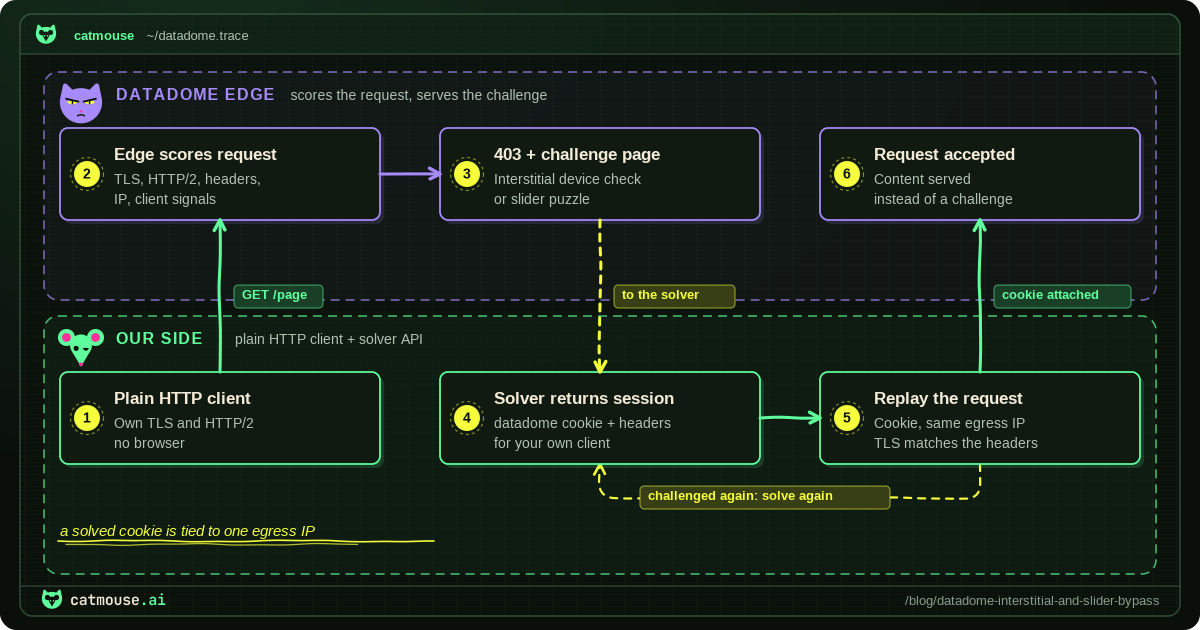
- What DataDome does: it scores each request and, when a request looks automated, returns a challenge such as an interstitial or a slider puzzle instead of the content.
- What you see: challenged requests commonly get HTTP 403 (RFC 9110 section 15.5.4) with a challenge page. Confirm this on your own authorized traffic.
- The cookie: per the DataDome cookie documentation, the
datadomecookie is used on the server and in the client to assess the legitimacy of a request. - Limits: acceptance of a cookie is decided by DataDome's scoring and can change at any time. This article publishes no benchmark and no pass rate.
- Who it is for: engineers who own or are authorized to test the target and want to understand the mechanism.
How DataDome challenges automated requests?
DataDome is a commercial bot-protection service that evaluates requests and decides whether to serve the content or a challenge. Per its own DataDome cookie documentation, the datadome cookie is used for both server-side and client-side detection, holds encrypted data and contains no personally identifiable information.
Services of this kind can combine network attributes (the TLS handshake, HTTP/2 settings, IP reputation), request headers and client-side signals. DataDome publishes its own description of what it uses, and this article does not claim a complete list. A request that fails scoring commonly receives HTTP 403, which RFC 9110 section 15.5.4 defines as the server refusing to fulfil the request, together with a challenge page.
Why a clean IP address is not enough
IP reputation is one input among several. A request from a good address can still be challenged if its headers, TLS handshake or client-side signals disagree with the browser it claims to be.
What the interstitial and device check do?
The interstitial is a page that runs a JavaScript device check before the visitor reaches the content. The script reads values from the browser, sends them to DataDome and, if the result is accepted, a valid cookie is set and the original request can proceed.
The W3C WebDriver specification defines navigator.webdriver, which is true when a browser is under remote control, so automation frameworks are detectable by default unless this and other differences are handled. The exact payload format is not public and is not described here.
- datadome cookie
- Per the DataDome cookie documentation, used on the server and in the client to assess whether a request is legitimate. The page lists its expiry as 1 year, but whether a given cookie is still accepted is decided by DataDome's scoring.
- Interstitial
- A challenge page that runs client-side checks before content is served.
- Device check
- Client-side JavaScript that collects browser and device signals and reports them.
What a slider challenge asks of the client?
A slider challenge shows an image with a missing piece and asks the visitor to drag a handle until the piece fits. Such a challenge checks whether the offset is right and may also consider whether the pointer movement looks like a person's. DataDome's exact checks are not published, so this is a general description.
Scripted pointer movement may lack the variation of human input, and a vendor could in principle use input timing as a signal. DataDome does not publish whether or how it does.
How to choose between a browser and a protocol-level client?
Choose a real browser when you need rendered output, run low volume, or cannot depend on an external service. Choose a protocol-level client when you only need the data, run at higher concurrency, and accept the cost of acquiring valid cookies without a browser. The table compares them by criteria and contains no measured numbers.
| Criterion | Real browser automation | Protocol-level client |
|---|---|---|
| Setup | Install a browser, a driver and often stealth patches | An HTTP client plus a way to obtain a valid cookie |
| Per-request resource use | A full browser process per session, which is the largest cost item at high concurrency | One HTTP connection per session, no rendering |
| What it must match | Browser signals must look consistent with a real device | TLS handshake, HTTP/2 settings and headers must look consistent with the client you claim to be |
| Maintenance | Driver and patch updates when the challenge script changes | You maintain the cookie-acquisition step yourself whenever the challenge changes |
| Visibility | You can watch what the page does | You see only status codes and response bodies |
| Measured numbers for DataDome targets | Not published here | Not published here. Measure it on your own infrastructure |
Why Puppeteer and Playwright are often challenged?
Automated browsers are often challenged because they differ from ordinary browsers in ways a script can measure. The differences below are documented in general, though which of them a given site checks is not public.
- Automation flag:
navigator.webdriveris true under WebDriver control. - Environment mismatches: a headless build can report plugins, fonts or rendering values that differ from a desktop browser.
- Input behavior: scripted pointer movement can lack natural variation.
- Resource cost: each session needs a full browser process, which limits concurrency on a given machine.
Stealth plugins patch some of these. A site that checks for the patches themselves, or for other inconsistencies, can still challenge the session.
How a protocol-level client relates to the datadome cookie?
A protocol-level client sends plain HTTP requests and attaches a cookie it obtained elsewhere, for example from a browser session you are authorized to run. For the cookie to be accepted, the rest of the request has to look consistent with it: the same egress IP, headers that match a real browser and a TLS handshake that resembles the browser the headers claim.
- Obtain the cookie from a session on a system you own or are authorized to test.
- Attach the cookie and matching headers to your HTTP client.
- Send requests from the same egress IP, since the Catmouse targets directory notes that the cookie is bound to the exit IP.
- When the target answers with a challenge status, restart the session instead of retrying blindly.
The JA4 TLS fingerprint method is documented publicly by FoxIO on GitHub if you want to compare your client's handshake with a browser's.
What the Catmouse API does and does not cover?
Catmouse's Solver API handles one vendor, Kasada: its engine values are Kasada device profiles (chrome, snkrs, wkw, fl, whatnot-ios, android), not vendors. Neither the API reference nor the server source lists a DataDome engine, so this article contains no request example for DataDome and does not imply one exists.
If your own recordings show that a site runs Kasada, the real call sequence (fetch ips.js yourself, post it to /Solver/solve, send the returned /tl body) is shown with the canonical Python sample in the Chewy guide. Which products a given site runs is something you confirm on your own authorized traffic.
Summary and next steps
A DataDome challenge is a scoring decision plus a client-side check. A real browser can pass it at small scale, and a protocol-level client needs a valid cookie from somewhere. Neither is guaranteed to work on a given site on a given day.
- Confirm the vendor from your own recordings of authorized traffic.
- Keep the egress IP, headers and TLS handshake consistent with the cookie you present.
- Treat a challenge status as the signal to restart the session.
- Do not expect a Catmouse engine for DataDome: the Solver API covers Kasada only.
For the parts of Catmouse that exist, read the API reference.
Scope, limitations, and recommendations
This article describes publicly documented DataDome behavior and the Catmouse API reference as of 2026-10-09, which covers Kasada only. It reports no measurements, no case study and no pass rate, because none were available to source. The payload format and scoring thresholds of DataDome are not public and are not described. Vendor behavior can change without notice. Service levels and compliance attestations are not claimed here.
How does datadome interstitial and slider bypass validate a trusted TLS session?
For datadome interstitial and slider bypass, a client is a verified session when it sends fresh tokens versus static headers over a trusted TLS session.
Apply this material only to DataDome deployments that you own or hold written permission to test. Check the target site's terms of service, robots.txt and any partner or API program before you automate access, and prefer an official feed where one exists.
Last reviewed: 2026-10-09.
Evidence and sources
The statements above that rest on outside material are listed here with the source that supports each. Every link was opened on 2026-10-09 and the quoted text was read there.
- RFC 9110 section 15.5.4: “The 403 (Forbidden) status code indicates that the server understood the request but refuses to fulfill it.” Supports: what HTTP 403 means, not which product returns it.
- DataDome cookie documentation: “Used for both server-side and client-side detection to assess the legitimacy of a request.” and “The cookie's data is encrypted for security and does not contain any personally identifiable information (PII).” The expiry is listed as “1 year.” Supports: the cookie purpose, encryption and expiry statements in this article.
- W3C WebDriver specification (webdriver-active flag): “The webdriver-active flag is set to true when the user agent is under remote control.” Also MDN: Navigator.webdriver: “The webdriver read-only property of the navigator interface indicates whether the user agent is controlled by automation.” Supports:
navigator.webdriverexists and reflects automation. That challenge scripts read it is an inference, not something these pages state. - FoxIO JA4 repository: the README covers JA4 TLS client fingerprinting and states it is open source under BSD 3-Clause. Supports: that the JA4 method is publicly documented.
- /openapi.json (Catmouse OpenAPI file, read 2026-10-10): describes
POST /Solver/solveas taking the text of a fetched Kasadaips.jsand anenginethat selects a Kasada device profile (chrome,snkrs,wkw,fl,whatnot-ios,android). Supports: the statement in this article that the Catmouse API offers no engine for this vendor. Catmouse wrote that file; see the bot management reference for the shared background.
Not sourced: DataDome does not publish its scoring inputs or thresholds, so the signals listed in this article are general possibilities, not DataDome facts.
Methodology and limits
Documented: HTTP status meanings, the WebDriver flag and the Catmouse API fields, each from the source named above. Observation, not documented by a vendor: which anti-bot product a site runs, what its challenge response looks like and how it behaves for a given client. Catmouse made no measurements for this article. Reviewed 2026-10-09; vendor behavior changes without notice, so re-check on your own authorized traffic.
What separates datadome interstitial and slider bypass telemetry from plain HTTP replay?
In contrast, on datadome interstitial and slider bypass, you must refresh session state whenever a route returns a challenge instead of reusing old headers.
Frequently Asked Questions
What triggers a DataDome challenge?
DataDome does not publish its full rules. Inputs it can use include the IP address, request headers, the TLS handshake and client-side signals, and a mismatch between them can lead to a challenge.
How long does a datadome cookie stay valid?
The DataDome documentation lists the cookie expiry as 1 year. Whether a particular cookie is still accepted is decided by DataDome's scoring, so refresh when the target returns a challenge.
Can residential proxies avoid DataDome on their own?
Not by themselves. IP reputation is one signal among several, and a good address does not replace consistent headers, TLS and client-side behavior.
Does Catmouse solve DataDome challenges?
No. The Catmouse Solver API handles Kasada only; its engine values are Kasada device profiles. This article publishes no DataDome benchmark and no pass rate.