macOS Fiddler Alternative: HarFiddle
HarFiddle is a free, MIT-licensed macOS app that records HTTP and HTTPS traffic and can replay a HAR file as a local mock server at http://localhost:8888. It is sponsored by Catmouse and is independent of Progress Software's Fiddler. Below: how it is built, how to install it, how to replay a HAR, and where it falls short.
Who this is for
Developers and QA engineers on macOS who debug HTTPS traffic and replay recorded requests on systems they own or are authorized to test.
On this page
- What is HarFiddle, and what is it not?
- Quick facts from the README
- How is HarFiddle built?
- How do you install HarFiddle on macOS?
- How do you replay a HAR file as a mock server?
- How do you capture HTTP and HTTPS traffic?
- What can AutoResponder rules do?
- What are the limitations and security caveats?
- When should you choose something else?
- Key takeaways
- Evidence and sources
- Frequently asked questions
What is HarFiddle, and what is it not?
HarFiddle is a free, open-source debugging proxy for macOS. It sits between your apps and the network, records requests and responses, lets you inspect and change them, and can answer requests itself from a HAR file instead of the real server. The README describes it as a modern Fiddler Classic alternative: a session list with colored rows, Inspectors, an AutoResponder, a Composer, Statistics, QuickExec and familiar shortcuts such as F12 and R to reissue.
It is not Fiddler. HarFiddle is an independent project, written from scratch, and contains no Fiddler code. It is not affiliated with or endorsed by Progress Software Corporation (the company behind Telerik Fiddler), and Fiddler is a trademark of Progress Software Corporation. The project is MIT licensed and sponsored by Catmouse; the source lives at github.com/Omar4GH/harfiddle.
Typical jobs: replay a customer's HAR file as a mock server, capture HTTP and HTTPS traffic from one browser or the whole Mac, open HAR files exported from Chrome, Firefox, Safari, Charles or Proxyman, and swap individual responses (status code, delay, local file, redirect) while testing.
Quick facts from the README
| Item | What the README says |
|---|---|
| Platform | macOS 12 or later, Apple Silicon and Intel |
| License | MIT (the bundled Node.js runtime keeps its own license) |
| Default ports | Proxy and mock server on 8888, UI on 8899, both on 127.0.0.1 |
| Download | Universal dmg named HarFiddle-<version>-macOS-universal.dmg, about 80 MB |
| Dependencies | None to install: Node.js is bundled in the app |
| Notarization | Not notarized by Apple; ad-hoc signed |
| Data location | Rules, settings and the root certificate live in ~/.harfiddle/ |
No throughput, latency or memory figures are given here because the README publishes none and we have not measured them. If performance matters for your workflow, test it on your own traffic.
How is HarFiddle built?
The app is a thin Swift window around a Node.js engine, not a fully native Cocoa or C++ proxy. Per the README, the bundle contains:
HarFiddle.app
├── Contents/MacOS/HarFiddle   Swift window with a WKWebView (macos/main.swift)
└── Contents/Resources
    ├── node/node              Node.js runtime (universal)
    └── app/
        ├── server.js          proxy, HTTPS interception, AutoResponder, HTTP API for the UI
        ├── lib/ca.js          root and per-site certificates (node-forge)
        └── public/            the UI: plain HTML, CSS and JavaScript, no build step
The engine listens on 127.0.0.1:8888 (proxy and mock server) and 127.0.0.1:8899 (UI). The window shows the UI and stops the engine when you quit. The release build bundles the current Node.js 22 LTS; the universal dmg is about 80 MB, mostly the Node.js runtime for both architectures. npm start runs the same engine and UI on any system with Node.js, but system-wide capture and the app itself are macOS only.
Core components inside the bundle
server.js(Proxy and AutoResponder engine)- Handles HTTP and HTTPS interception on port 8888, evaluates AutoResponder rules, and serves the REST API for the inspector UI on port 8899.
lib/ca.js(Certificate authority)- Generates the local root CA and per-site certificates in
~/.harfiddle/usingnode-forge. macos/main.swift(Native shell)- Hosts the
WKWebViewwindow and manages the child Node.js process lifecycle.
How do you install HarFiddle on macOS?
- Download
HarFiddle-<version>-macOS-universal.dmgfrom the latest release page. The page always points to the newest version, so no file name is hard-coded here. - Open the dmg and drag HarFiddle to Applications.
- The app is open source and not notarized by Apple, so macOS blocks the first launch. Either open System Settings › Privacy & Security, scroll down and click Open Anyway, or run this in Terminal:
xattr -dr com.apple.quarantine /Applications/HarFiddle.appThat command removes the quarantine flag that triggers the Gatekeeper prompt for this one app. Only run it on a download you obtained from the project's own releases page, and read the source or build from it yourself if you want certainty. Building from source needs macOS 12+, Node.js 18+ and the Xcode Command Line Tools; the README lists npm install and npm run build:mac.
How do you replay a HAR file as a mock server?
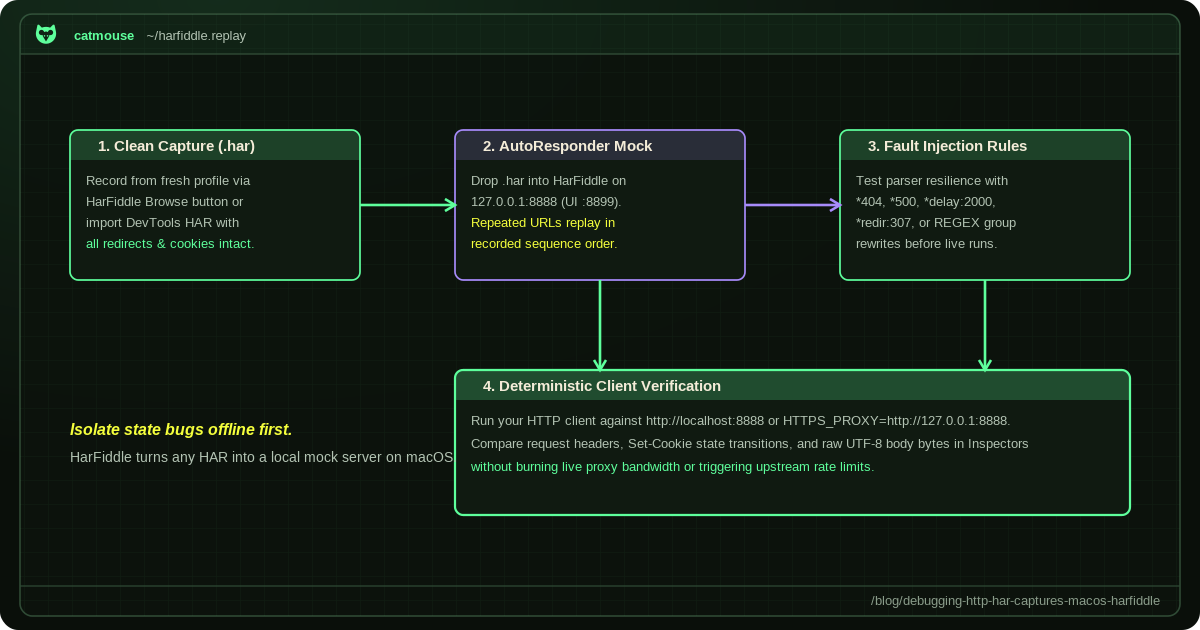
Drag a .har file onto the window and choose AutoResponder. Each recorded request becomes a rule. Then send requests to HarFiddle instead of the real API:
# the HAR has a response for https://api.example.com/v1/users/1
curl http://localhost:8888/v1/users/1
Requests sent straight to localhost:8888 are matched by path and query. If a URL appears several times in the HAR, responses come back in the recorded order, which suits polling endpoints (the README's demo HAR returns queued, then running, then done for /v1/jobs/42). Requests with no rule go to the fallback upstream you set under AutoResponder › Matching options, or get a 502. Rules also apply to traffic that passes through the proxy, where they match the full URL, so you can replace one API's responses inside a real site or app.
How do you capture HTTP and HTTPS traffic?
| Mode | How | HTTPS |
|---|---|---|
| One browser | Click Browse: opens Chrome with a separate profile routed through HarFiddle | Decrypted; the profile accepts the certificate with no system change |
| Whole Mac | Turn on System Proxy (or press F12). Previous proxy settings are restored when you turn it off or quit | Shown only after you trust the root certificate; until then passed through untouched |
| Command-line tools | Point the tool at 127.0.0.1:8888 | Decrypted when the client trusts the root certificate |
For scripts, the README suggests:
curl -x http://127.0.0.1:8888 -k https://httpbin.org/json

export HTTPS_PROXY=http://127.0.0.1:8888 HTTP_PROXY=http://127.0.0.1:8888
export NODE_EXTRA_CA_CERTS=~/.harfiddle/harfiddle-ca.pem   # Node.js
export REQUESTS_CA_BUNDLE=~/.harfiddle/harfiddle-ca.pem    # Python requests
Open a HAR from another tool with Load or File › Open to browse it like live traffic; nothing is sent anywhere. Save writes the session list back to the file.
What can AutoResponder rules do?
Rules are checked from top to bottom and the first enabled match wins.
| If the request matches | Meaning |
|---|---|
EXACT:https://api.example.com/v1/users?id=1 | That URL; query parameter order is ignored |
REGEX:^https://api\.example\.com/v1/(.*)$ | A case-insensitive regular expression |
example.com/v1 | Any URL containing that text |
* | Every request |
| Then respond with | Result |
|---|---|
| (empty) | The recorded response, editable in the rule editor |
*404, *500 | That status code with an empty body |
*delay:2000 | Wait 2 seconds, then forward to the real server |
*drop / *reset | Close or reset the connection |
*redir:https://... | A 307 redirect |
http://localhost:3000/$1 | Forward to another server; $1 comes from a REGEX group |
/Users/me/mock.json | Serve a local file |
What are the limitations and security caveats?
~/.harfiddle/harfiddle-ca-key.pem could impersonate websites to your Mac. The README says the key is created locally and never leaves your machine; keep it that way. HarFiddle also does not verify upstream certificates (so self-signed dev servers work), which means it will not warn you about a bad one. Only inspect traffic you are allowed to inspect.- macOS only. The app targets macOS 12 or later. Only the engine and UI run elsewhere via
npm start, without system capture. - Not notarized. You must approve the first launch manually, as described above.
- Pinned apps. Many apps reject unknown certificates. For System Proxy traffic HarFiddle only decrypts port 443 while macOS trusts the root certificate, and it passes a host through untouched for 30 minutes after an app keeps hanging up. Other connections show as Tunnel to host:443. Add hosts under Tools › Options › HTTPS › Skip decryption to exclude them permanently.
- Remove the certificate when finished. Delete HarFiddle Root CA in Keychain Access, and delete
~/.harfiddleto generate a new one. - Crash recovery. If the Mac loses connectivity after a crash while capturing, reopen HarFiddle or run
networksetup -setwebproxystate Wi-Fi off; networksetup -setsecurewebproxystate Wi-Fi off.
When should you choose something else versus HarFiddle?
HarFiddle is a good fit when you want a free, inspectable proxy on a Mac and your main need is HAR replay. In contrast, look elsewhere compared to HarFiddle if:
- your organization requires a notarized or commercially supported app, or an audited security posture for the tool itself;
- you need Windows or Linux capture, since the app and System Proxy support are macOS only;
- you need the official, supported Fiddler product: HarFiddle is a separate project and does not replace it;
- you need scripted add-ons or automation beyond what the README documents. Mature tools such as mitmproxy, Charles and Proxyman exist; check their own documentation for what they support, since this post does not benchmark them.
Conclusion and recommendations
Whichever tool you choose, capture only traffic you own or are explicitly authorized to inspect, and remove temporary root certificates when your debugging session concludes.
Key takeaways
- HarFiddle is an independent, MIT-licensed, Catmouse-sponsored debugging proxy for macOS, not affiliated with Progress or Fiddler.
- Architecture: a Swift WKWebView window around a bundled Node.js 22 engine, with a plain HTML/JS interface; the universal dmg is about 80 MB.
- Install from the releases page; the first launch needs Open Anyway or
xattr -dr com.apple.quarantine /Applications/HarFiddle.app. - Replay: drop a HAR on the window, choose AutoResponder, send requests to
http://localhost:8888. - Trusting the root certificate has real security implications; remove it when you are done.
Evidence and sources
- HarFiddle README. Supports: the MIT license, macOS 12 or later, ports 8888 (proxy and mock server) and 8899 (UI) on 127.0.0.1, the Swift window with a WKWebView, the bundled Node.js 22 LTS, the universal dmg of about 80 MB, the unnotarized app,
~/.harfiddle/, AutoResponder rule behaviour (recorded order for repeated URLs, 307 for*redir:, 502 when the fallback upstream applies), the 30-minute passthrough, the Browse button using a separate Chrome profile, and the statements that it is independent, contains no Fiddler code, and is sponsored by Catmouse. For example the README says: "The key is created locally and never leaves your machine", and the sentence continues beyond that point. - Apple Support, safely open apps on your Mac. Supports: Open Anyway under Privacy & Security for an app macOS blocks on first open.
- RFC 9110, section 15.4.8, section 15.6.3 and section 9.3.6. Supports: the standard meaning of 307 Temporary Redirect, 502 Bad Gateway and the CONNECT method behind the “Tunnel to host:443” entries.
- HTTP Archive (HAR) format draft. Supports: HAR as an archival format for HTTP transactions. The draft is dated 2012 and is marked as abandoned and not to be used, so it is cited for the format’s purpose, not as a current standard.
Documented: everything attributed to the README, Apple Support and the RFCs above. Not measured by us: any performance, memory or compatibility figure, and the behaviour of other tools such as mitmproxy, Charles and Proxyman, which this post does not benchmark. We did not re-run the app, so statements follow the README as read on 2026-10-09 and the project can change.
Frequently asked questions
What is HarFiddle?
HarFiddle is an open-source (MIT) Fiddler Classic alternative for macOS. It captures and inspects HTTP and HTTPS traffic and can answer requests from a HAR file with an AutoResponder. It is sponsored by Catmouse.
Is HarFiddle made by Progress or Telerik, the makers of Fiddler?
No. HarFiddle is an independent project written from scratch with no Fiddler code. It is not affiliated with or endorsed by Progress Software Corporation, and Fiddler is a trademark of Progress Software Corporation.
What is HarFiddle built with?
A small Swift window with a WKWebView shows the interface. A bundled Node.js 22 runtime runs the proxy engine, and the interface is plain HTML, CSS and JavaScript with no build step. The universal dmg is about 80 MB according to the README.
Why does macOS block HarFiddle the first time I open it?
The app is open source and not notarized by Apple. Open System Settings, Privacy & Security and click Open Anyway, or remove the quarantine attribute with xattr -dr com.apple.quarantine /Applications/HarFiddle.app.
How does HarFiddle return responses for repeated URLs?
If a URL appears several times in the HAR, the responses are returned in the recorded order by default. The Matching options in the AutoResponder can instead cycle through them or always return the first one.
Can I decrypt HTTPS without changing system certificate settings?
Yes, for one browser. The Browse button opens Chrome with a separate profile that goes through HarFiddle and accepts its certificate. Decrypting traffic from the whole Mac requires trusting the HarFiddle root certificate.