Debugging HTTP and HAR Captures on macOS with HarFiddle
An HTTP Archive (HAR) is a JSON log of a browser session's network requests, headers, and responses. When a request works in Chrome but fails in a script, use HarFiddle on macOS to record a cold-start capture and replay the HAR locally at http://localhost:8888. Below: why captures fail, how to replay them, and what HAR omits.
Who this is for
Engineers and QA developers on macOS who debug HTTP clients on systems they own or are authorized to test, and need a repeatable workflow for turning browser captures into clean request sequences.
On this page
- Why do browser HAR exports fail in plain HTTP clients?
- How do you record a clean cold-start capture on macOS?
- How do you replay a HAR file as a local mock server?
- How do AutoResponder rules test client resilience?
- What does a HAR file omit about TLS and HTTP/2?
- Key takeaways
- Conclusion and scope
- Evidence and sources
- Frequently asked questions
Why do browser HAR exports fail in plain HTTP clients?
A copied browser request usually fails in a standalone script because it omits earlier cookies, redirect hops, or one-time tokens.
An HTTP Archive (HAR) is a JSON-formatted log of a web browser's transactions with a server. When an engineer exports a request from DevTools and runs it in Python, Node.js, or Go, the server frequently answers with 400 Bad Request, 403 Forbidden, or 429 Too Many Requests (defined in RFC 9110 and RFC 6585). Check five common causes before blaming TLS fingerprinting:
- Warm-profile state leakage: Opening DevTools on an active tab reuses existing cookies and localStorage tokens. A capture started mid-session misses the initial handshake.
- Hard-coded one-time tokens: Challenge headers such as Kasada's
x-kpsdk-ctand single-usex-kpsdk-cd, or hCaptcha'sh-captcha-response, cannot be replayed from a static paste. - Corrupted script or payload bytes: On Kasada endpoints, the fetched
ips.jsscript must reachPOST /Solver/solveas unmodified UTF-8 text, and the base64payloadmust be decoded to raw bytes before posting to/tl. - Header family mismatches: Sending desktop Chromium
sec-ch-uaClient Hints alongside a mobile Safari or iOS User-Agent creates an immediate contradiction. - Dropped redirect cookies: Authentication flows often set cookies on
302or307redirect hops that default HTTP clients fail to persist.
How do you verify capture mistakes in HarFiddle?
Compare the failing script request against the recorded browser session in the HarFiddle Inspector.
| Symptom | Typical capture mistake | How to verify in HarFiddle |
|---|---|---|
| Immediate 400 or 422 on solver call | Truncated or re-encoded ips.js body, or stale x-kpsdk-v version string | Inspect the raw response bytes of the script request in the HarFiddle Inspector |
200 on /tl with no x-kpsdk-r token | Stale version pin, mismatched Timezone/TimezoneOffset vs exit IP, or dirty egress IP | Compare the live served x-kpsdk-v query parameter against your script's request |
| 403 on protected POST after passing challenge | Reusing a single-use x-kpsdk-cd or h-captcha-response token across two calls | Filter the session list by header to confirm each POST carries a freshly generated token |
| Missing session cookie on step 3 | Capture started in a warm tab after the cookie was already set | Launch a clean profile via the Browse button and record from the first navigation |
How do you record a clean cold-start capture on macOS?
Click the Browse button in HarFiddle to launch an isolated Chrome profile with an empty cookie jar routed through 127.0.0.1:8888.
HarFiddle is a free, MIT-licensed macOS debugging proxy sponsored by Catmouse (and independent of Progress Software's Fiddler). As covered in our HarFiddle architecture and installation guide, the app runs a local proxy on 127.0.0.1:8888 and a UI on 127.0.0.1:8899.
Step-by-step cold-start recording
Follow these four steps to capture every bootstrap request without modifying your macOS system keychain:
- Open HarFiddle on macOS and click Browse in the toolbar.
- HarFiddle launches Google Chrome with a dedicated user profile pre-configured to route traffic through
127.0.0.1:8888and trust the local HarFiddle certificate for that browser only. - Navigate to the target URL you are authorized to test. Because the profile starts cold, every initial
429challenge,Set-Cookieheader, and redirect hop is recorded in order. - Click Save to export the session list as a standard
.harfile.
How do you replay a HAR file as a local mock server?
Drag a .har file onto the HarFiddle window, choose AutoResponder, and send requests to http://localhost:8888.
Debugging parser logic or cookie jars directly against a live endpoint wastes proxy bandwidth and risks rate limits. Replaying the HAR locally lets you verify your client offline first.
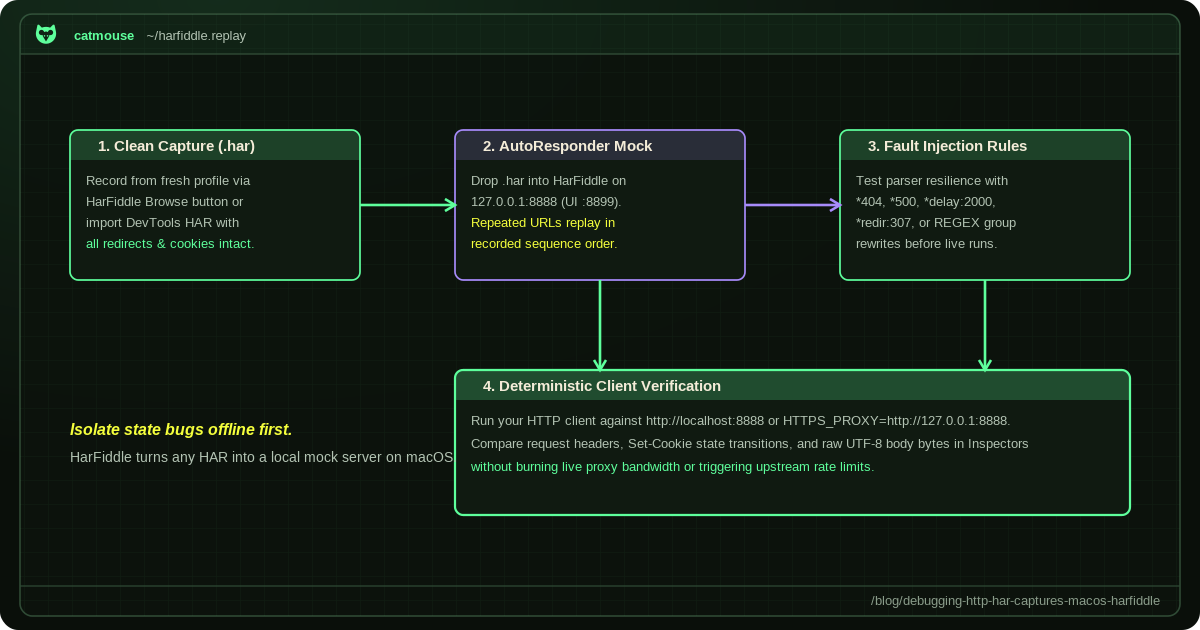
Direct mock mode versus proxy pass-through mode
Per the HarFiddle README, each entry in the HAR file becomes a rule on http://localhost:8888:
- Direct mock mode: Send requests directly to
http://localhost:8888/path?queryand HarFiddle matches by path and query string. - Proxy pass-through mode: Set
HTTP_PROXY=http://127.0.0.1:8888andHTTPS_PROXY=http://127.0.0.1:8888(plusNODE_EXTRA_CA_CERTS=~/.harfiddle/harfiddle-ca.pemorREQUESTS_CA_BUNDLE=~/.harfiddle/harfiddle-ca.pem) so your client uses the target URLs while HarFiddle intercepts matching rules locally. - Sequential replay: When a flow hits the same URL multiple times—such as a challenge endpoint returning
429before a solve and200afterward—HarFiddle returns the recorded responses in chronological order by default.
How do AutoResponder rules test client resilience?
AutoResponder rules let you inject status codes, delays, socket drops, and redirects to verify how your client handles failures offline.
In HarFiddle's AutoResponder, rules are evaluated top-to-bottom (using EXACT:, REGEX:, substring, or * wildcards) and support built-in actions documented in the README:
# Example CLI test against HarFiddle local proxy on 127.0.0.1:8888
curl -i -x http://127.0.0.1:8888 -k https://api.example.com/v1/checkout*404,*500(or any status code)- Immediately returns that HTTP status with an empty body so you can verify that your client aborts on
400errors and backs off on500or503responses. *delay:2000- Pauses for two seconds before forwarding or answering, allowing you to test client timeout handling (such as the 60-second timeout on
POST /Solver/solveor the 95-second timeout onPOST https://api.hcap.catmouse.ai/solve). *dropand*reset- Closes or resets the TCP socket mid-flight to verify that your connection pool recovers from dropped residential proxy exits.
*redir:https://...- Returns an HTTP
307 Temporary Redirect(RFC 9110 section 15.4.8) to verify whether your client preserves method, body, and cookies across redirects.
What does a HAR file omit about TLS and HTTP/2?
A HAR file records HTTP headers and bodies, but it omits TLS ClientHello cipher suites, HTTP/2 frame settings, and exit-IP geography.
While browser DevTools and HAR viewers are convenient for inspecting JSON payloads, they can give a false sense of security when a target also checks transport-layer signals. Conversely, jumping straight to TLS spoofing without checking HAR cookie and header continuity wastes time when a simple missing cookie is to blame. Once your sequence passes against a HAR replay in HarFiddle, verify three transport details:
- TLS and HTTP/2 client profile: Standard language HTTP libraries emit distinctive TLS ClientHello and HTTP/2 settings frames. Ensure your HTTP client's transport profile aligns with the User-Agent and
engineprofile you send. - Exit-IP and timezone coherence: On the Catmouse Kasada API (
/reference.html),TimezoneandTimezoneOffset(ortzandtzOffset) are mandatory and must match the geographic location of your egress proxy IP. A mismatch causes the target to decline the submission downstream (EMPTY_R). - Live script version: Never hard-code the
x-kpsdk-vversion from an old HAR file. Parse the currentx-kpsdk-vdynamically from the live challenge response on each run.
Key takeaways
- Cold-start capture: Use HarFiddle's Browse button on macOS to capture from an empty Chrome profile so no initial cookies or challenge requests are missed.
- Offline HAR replay: Drop a
.harfile onto HarFiddle's AutoResponder to replay responses on127.0.0.1:8888in recorded chronological order. - Byte integrity: Pass challenge script bodies (such as
ips.js) as raw UTF-8 text and decode base64 payloads to raw bytes before submission. - Fault injection: Test
*404,*500,*delay:2000, and*droprules locally before deploying retry logic to production. - Transport alignment: Pair clean HTTP state with coherent TLS, HTTP/2, and exit-IP timezone settings.
Conclusion and scope
Most script failures that look like anti-bot blocks are actually state continuity bugs caused by warm-browser exports, mutated bytes, or dropped redirect cookies. Recording a cold-start session in HarFiddle and replaying the HAR locally on port 8888 separates HTTP state bugs from transport-layer checks before you touch a live target.
Scope and authorized use. This guide describes HTTP capture hygiene and local HAR replay using HarFiddle as documented in the project README on 2026-10-10, with no performance benchmarks. Keep ~/.harfiddle/harfiddle-ca-key.pem private, remove the root certificate from Keychain Access when finished, and capture or replay traffic only on systems you own or have explicit written permission to test.
Evidence and sources
The statements in this guide rest on the following primary sources:
- HarFiddle GitHub repository and README. Supports: macOS 12+ support, MIT license, Catmouse sponsorship, independence from Progress Software/Fiddler, local ports
8888(proxy/mock server) and8899(UI), the Browse button launching an isolated Chrome profile, chronological AutoResponder replay for repeated URLs, rule prefixes (EXACT:,REGEX:), and actions (*404,*500,*delay:2000,*drop,*reset,*redir:). Read 2026-10-09. - Catmouse OpenAPI 3.1 specification (
/openapi.json) and API reference (/reference.html). Supports: the required raw UTF-8ips.jsscript handling, dynamicx-kpsdk-vversion requirement, mandatoryTimezone/TimezoneOffsetgeo coherence, single-usex-kpsdk-cdproof-of-work tokens, and downstreamEMPTY_Rrefusal behaviour. Reviewed 2026-10-10. - RFC 9110 (HTTP Semantics) and RFC 6585. Supports: standard definitions of HTTP
307 Temporary Redirect(section 15.4.8),403 Forbidden(section 15.5.4),502 Bad Gateway(section 15.6.3), and429 Too Many Requests. - HTTP Archive (HAR) v1.2 draft specification. Supports: the scope of HAR files as JSON archives of HTTP-layer transactions rather than TLS handshake captures.
Methodology and limits. Documented: HarFiddle features from its README, Catmouse API requirements from /openapi.json and /reference.html, and HTTP status semantics from the RFCs above. Reviewed 2026-10-10.
Frequently asked questions
Why does a request copied from browser DevTools as cURL fail in a script?
Copy as cURL exports only one isolated request. It omits earlier redirect hops, dynamic CSRF or challenge tokens fetched by previous calls, Set-Cookie rotations, and the browser profile state that established the session.
How do you record a clean HAR capture without stale browser cookies?
Start from a fresh browser profile before opening the target page. In HarFiddle on macOS, clicking the Browse button opens Chrome with an isolated profile routed through 127.0.0.1:8888 so every initial bootstrap request, redirect, and cookie is recorded from a cold start.
How does HarFiddle replay polling or multi-step endpoints from a HAR file?
When you drop a HAR file onto HarFiddle and select AutoResponder, repeated URLs return their recorded responses in chronological order by default. You can also configure Matching options to cycle through responses or always return the first match.
Why must challenge script bodies be kept as raw UTF-8 bytes?
Anti-bot scripts such as Kasada ips.js are sensitive to byte-level mutations. Re-encoding, pretty-printing, or stripping characters from a captured script body changes its contents and causes parser or integrity refusals (400 or 422).
Does a HAR file capture TLS handshake fingerprints or proxy geography?
No. The HTTP Archive (HAR) format records HTTP-layer headers, bodies, and timings, not TLS ClientHello cipher suites, HTTP/2 frame settings, or exit-IP timezone alignment. Those transport properties must be verified separately in your HTTP client.