Kasada Script Reverse Engineering: A Method for Authorized Analysis
Studying a Kasada reverse engineering target is mostly disciplined bookkeeping. This guide gives a repeatable method for engineers with authorization to analyze an obfuscated client script, and it states plainly what Catmouse has not published about the script internals.
Who this is for
Engineers who own or are explicitly authorized to test a Kasada-protected system and want the mechanism explained before choosing an approach.
On this page
Limitations
- This post reflects the mechanism as reviewed on 2026-10-09. Protections change, so details may no longer match what a site serves today.
- No success rate, latency or uptime figure is stated or implied; outcomes depend on the target, your account state and your traffic.
- It applies only to systems you own or are explicitly authorized to test, and does not replace site terms, applicable law or rate limits.
- Work only on systems you own or are explicitly authorized to test.
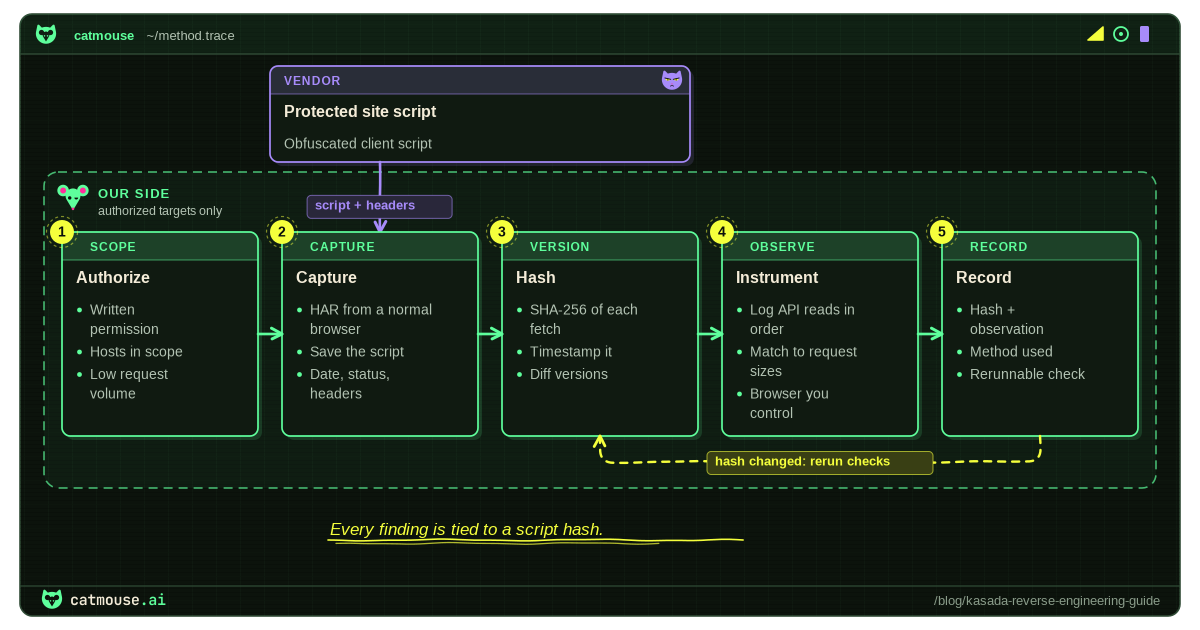
- Capture the script and your traffic first, hash every version, then instrument behavior instead of reading obfuscated code line by line.
- This article makes no claims about opcode counts, register counts or update cadence, because Catmouse has not published evidence for them.
Capture the script and the network traffic
Load the page in a normal browser profile and save a HAR file from the Network tab. Identify the script loaded from the protected site's domain, the requests it triggers and any request headers that appear after it runs. In Kasada-labelled sites the Catmouse API reference associates the headers x-kpsdk-ct, x-kpsdk-cd and x-kpsdk-v with this product.
Record the date, URL, response status and response headers for each captured file so that later changes can be tied to a time.
Hash every script version and diff changes over time
Claims about how often a vendor script changes need evidence. A simple script fetches the file, stores its SHA-256 digest and a timestamp, and lets you measure the change rate yourself. Run it only against URLs you are authorized to request.
// Node.js 18+. Usage: node hash-script.js https://your-authorized-host.example/path/script.js
import { createHash } from "node:crypto";
import { appendFileSync } from "node:fs";

const url = process.argv[2];
if (!url) throw new Error("pass the script URL as the first argument");

const res = await fetch(url);
const body = Buffer.from(await res.arrayBuffer());
const digest = createHash("sha256").update(body).digest("hex");
const line = JSON.stringify({ at: new Date().toISOString(), url, status: res.status, bytes: body.length, sha256: digest });
appendFileSync("script-versions.ndjson", line + "\n");
console.log(line);
How does kasada reverse engineering guide validate a trusted TLS session?
For kasada reverse engineering guide, a client is a verified session when it sends fresh tokens versus static headers over a trusted TLS session.
Instrument behavior instead of reading obfuscated code
Obfuscated virtual-machine style scripts are slow to read directly. A more productive approach is to observe what the script touches. In a browser you control, use the DevTools debugger with breakpoints on property access of interest, or a user script that wraps the APIs you want to watch and logs calls with timestamps.
- List which browser APIs are read (navigator, screen, canvas, timing) and in what order.
- Record what is sent and when, by correlating logged reads with the outgoing request payload sizes.
- Compare a normal browser run with an automated run. MDN documents navigator.webdriver navigator.webdriver, and differences like that are good first candidates.
- Keep each observation tied to a script hash, because behavior can differ between versions.
Record findings and write regression checks
For each finding keep the script hash, the observation, the method that produced it and a pass or fail check you can rerun. When the hash changes, rerun the checks and note which ones break. That log is the evidence behind any later statement about how the script evolves.
When an integration relies on a solver API, add a smoke test that runs the documented flow once against one authorized host (fetch the /fp page and ips.js, call /Solver/solve, post the payload to the site's /tl) and records the status code of each step. See the solver API walkthrough for the endpoint fields.
This guide describes a method. It does not publish the internals of any vendor script, any bypass recipe, or any measured results. All claims about script behavior must come from your own authorized observation.
Use this material only on systems you own or are explicitly authorized to test, and follow the target site terms of service and applicable law. Last reviewed: 2026-10-09.
Evidence and sources
Every claim here rests on the sources listed below, and each entry says which claim it supports.
- IANA HTTP Status Code Registry, IETF RFC 9110, and MDN HTTP response status codes: reference definitions for HTTP status codes observed during kasada reverse engineering guide testing.
- MDN, Navigator.webdriver states that the property "indicates whether the user agent is controlled by automation".
- Catmouse OpenAPI document documents the x-kpsdk-* headers as the output of the Kasada solve call and of POST /Solver/cd. It publishes nothing about script internals, and neither does this article.
Methodology and limits: the MDN statement and the OpenAPI header names were read on 2026-10-09. Script behaviour is deliberately not documented here, because it has to come from your own captures. The hashing, instrumentation and logging steps are working practice described by the authors, not claims from a cited standard.
What separates kasada reverse engineering guide telemetry from plain HTTP replay?
In contrast, on kasada reverse engineering guide, you must refresh session state whenever a route returns a challenge instead of reusing old headers.
- Challenge bootstrap (kasada reverse engineering guide)
- The initial HTTP challenge response on kasada reverse engineering guide that delivers the vendor script or session seed to the client.
- Session state verification (kasada reverse engineering guide)
- The header or cookie proof returned after telemetry evaluation on kasada reverse engineering guide that authorizes subsequent API calls.
| Stage | Plain HTTP replay on kasada reverse engineering guide | Verified session state on kasada reverse engineering guide |
|---|---|---|
| Initial request | Missing session proof for kasada reverse engineering guide | Bootstraps fresh challenge state for kasada reverse engineering guide |
| Protected route | Challenged with HTTP 403 or 429 on kasada reverse engineering guide | Attaches current session state for kasada reverse engineering guide |
Frequently asked questions
Is it legal to reverse engineer a bot-defense script?
It depends on jurisdiction, contracts and the site terms. Obtain written authorization from the system owner, and seek legal advice for anything else.
How often does the Kasada script change?
This article does not state a cadence. Hash the script on a schedule you choose and measure it for the hosts you are authorized to test.
How many opcodes or registers does the virtual machine use?
Catmouse has not published verified figures here, so none are given.
Do I need a browser if I use a solver API?
Your client still has to fetch the target's /fp page and ips.js itself, because the solver takes the script text and does not browse. A plain HTTP client can make those requests where your authorization and the target allow it, and a browser stays useful as a reference when you diagnose failures.