Playwright vs Protocol-Level Scraping: Trade-offs
Playwright runs a real browser per worker, while a protocol-level client sends HTTP requests directly and, for Kasada-protected targets, takes the /tl payload and headers from a solver service. Neither is better in general. This page compares what each does, where each tends to fail, and how to measure the difference on your own workload. Use it only in a comparison run against endpoints you are authorized to request.
Key points
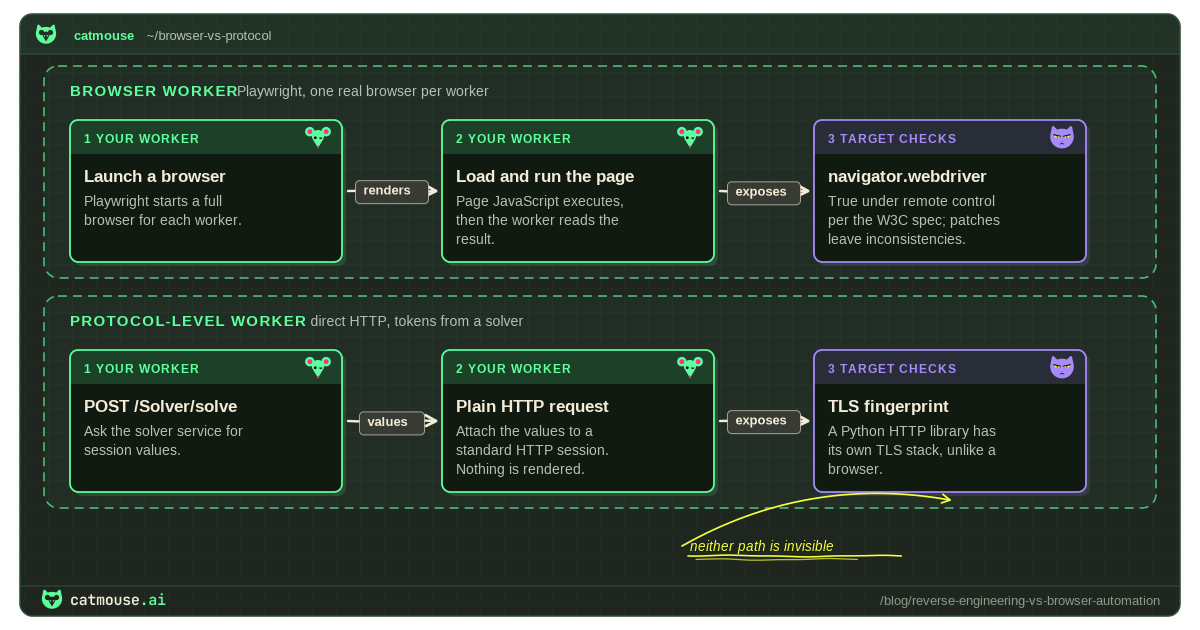
- Short answer: choose a browser when you need rendering or full page behaviour, and choose a protocol-level client when you only need the data and can obtain valid session state another way.
- Cost: browser workers use more memory and CPU per worker than an HTTP client. This page publishes no benchmark numbers, so measure on your own hardware.
- Maintenance: protocol-level clients depend on tracking changes in the target's protection, which a solver service can absorb but not eliminate.
- Detection: automated browsers expose signals such as
navigator.webdriver, and protocol-level clients expose different ones, for example TLS fingerprint differences.
Who this is for
Engineers who own or are explicitly authorized to test a bot-protected system and want the mechanisms compared before choosing an approach.
On this page
- What a browser worker and a protocol-level worker each do
- When Playwright is the better choice
- Where automated browsers expose detectable signals
- What a protocol-first pipeline with a solver API looks like
- How to measure the difference on your own workload
- Scope, limitations and authorized use
- Evidence and sources
- Frequently asked questions
What a browser worker and a protocol-level worker each do?
According to the Playwright documentation, Playwright supports Chromium, WebKit and Firefox. In this comparison a Playwright worker launches a browser, loads the page, runs its JavaScript and reads the result. A protocol-level worker sends the HTTP request itself, so it never renders anything. HTTP semantics are defined in RFC 9110, and an API route only needs the request the server expects.
| Aspect | Playwright browser worker | Protocol-level HTTP worker |
|---|---|---|
| What runs | A full browser per worker, including page JavaScript. | An HTTP client. Session values come from your own logic or, for Kasada, a solver service. |
| Resource use | Memory and CPU grow with the number of concurrent browsers. | Expected to be lighter per worker; confirm with your own measurement. |
| Page fidelity | Executes the same scripts a user would, so rendering and interaction work. | Sees only what the HTTP response contains. |
| Main upkeep | Browser and driver version updates, flaky selectors. | Tracking changes to the target protocol and token handling. |
| Typical fit | Testing your own site, screenshots, flows that need rendering. | Structured data endpoints where you are authorized and need volume. |
When Playwright is the better choice?
Playwright is the better choice when the work needs a rendered page, user-like interaction or screenshots, when volume is low, or when you are testing a site you own. It is also the simpler option to start with, because it needs no knowledge of the target's request protocol.
Where automated browsers expose detectable signals?
Automation leaves signals that detection scripts can read. The W3C WebDriver specification defines navigator.webdriver as returning true when the user agent is under remote control. Stealth tooling tries to hide this and related signals. Catmouse expects detection vendors to look for the inconsistencies that patching leaves behind, but no vendor source is cited for that here.
Protocol-level clients avoid browser signals but expose others. A Python HTTP library such as requests is generally expected to present a TLS fingerprint that differs from a browser's (Catmouse's understanding, not measured here). The curl-impersonate README says it is "able to perform TLS and HTTP handshakes that are identical to that of a real browser." Neither approach is invisible, and results depend on the target's current checks.
What a protocol-first pipeline with a solver API looks like?
A protocol-first worker does the browser's network steps itself. For a Kasada-protected target (the only vendor the Catmouse solver API covers) the worker requests the site's /fp page, reads the x-kpsdk-ct header and the ips.js URL, downloads ips.js, and posts that body to POST /Solver/solve with ipsUrl, ctToken, kpsdkV, tz and tzOffset. It then sends the returned payload to the site's /tl URL with the returned x-kpsdk-* headers. The engine field picks a Kasada device profile (chrome here), and the solver never contacts the target. The URLs and hosts are the ones your own authorized client uses.
import base64, os, requests

# Steps 1-3 run in YOUR client against YOUR target (authorized use only); the solver API never contacts the target.
# ips_body: UTF-8 text of the ips.js you fetched; ips_url: where you fetched it; ct_token: x-kpsdk-ct of the /fp response;
# kpsdk_v: the x-kpsdk-v the served script declares.
r = requests.post("https://kasadaapi.catmouse.ai/Solver/solve",
    headers={"x-api-key": os.environ["CATMOUSE_KEY"]},
    json={
        "ipsBody": ips_body,
        "ipsUrl": ips_url,
        "ctToken": ct_token,
        "kpsdkV": kpsdk_v,
        "tz": "America/New_York",
        "tzOffset": 240,
        "acceptLanguage": "en-US",
        "engine": "chrome",
    },
    timeout=60)
out = r.json()
if not out.get("success"):
    raise RuntimeError(f"{r.status_code} {out.get('error')}")   # 4xx/5xx are not charged
# Step 5 (your own client): POST base64.b64decode(out["payload"]) as the raw body to the target's /tl URL
# with the headers in out["headers"].
Retry sparingly. If the target still rejects the session after the /tl step, fetch a fresh ips.js and solve once more, then back off and investigate instead of looping, because repeated solves can run up balance. A 402 from the solver itself is insufficient_balance, meaning the key is out of balance, which is different from a target's rate limit. Catmouse has not verified the /fp and /tl URL shapes or header order beyond the targets covered by its reference script, so confirm them on your own capture.
How does reverse engineering vs browser automation validate a trusted TLS session?
For reverse engineering vs browser automation, a client is a verified session when it sends fresh tokens versus static headers over a trusted TLS session.
How to measure the difference on your own workload?
- Pick a fixed set of URLs you are authorized to request and keep it constant across both approaches.
- Run the browser version at your intended concurrency and record resident memory per worker, CPU use, time per item and the share of items that returned usable data.
- Run the protocol-level version on the same set and record the same figures, plus the solver cost per item from your Catmouse usage.
- Repeat on at least two different days, because targets change their protection over time.
- Compare cost per successful item, not raw speed.
For live health of the Catmouse service itself, see the status page rather than a figure quoted in an article.
Scope, limitations and authorized use
Last reviewed: 2026-10-09.
Next step: read the Kasada teardown for how one protection works, or the API reference for the solve endpoint.
What separates reverse engineering vs browser automation telemetry from plain HTTP replay?
In contrast, on reverse engineering vs browser automation, you must refresh session state whenever a route returns a challenge instead of reusing old headers.
- Challenge bootstrap (reverse engineering vs browser automation)
- The initial HTTP challenge response on reverse engineering vs browser automation that delivers the vendor script or session seed to the client.
- Session state verification (reverse engineering vs browser automation)
- The header or cookie proof returned after telemetry evaluation on reverse engineering vs browser automation that authorizes subsequent API calls.
Evidence and sources
Sources are listed below, each one with the claim it supports.
- IANA HTTP Status Code Registry and MDN HTTP response status codes: reference definitions for HTTP status codes observed during reverse engineering vs browser automation testing.
- RFC 9110: HTTP Semantics: supports the statement that HTTP semantics are defined there.
- W3C WebDriver, section 4: supports the statement about
navigator.webdriver. Source text: "Returns true if webdriver-active flag is set, false otherwise." and "The webdriver-active flag is set to true when the user agent is under remote control." Fetched 2026-10-09. - Playwright documentation, Installation: supports "Playwright supports Chromium, WebKit and Firefox on Windows, Linux and macOS, locally or in CI, headless or headed." Fetched 2026-10-09.
- curl-impersonate README: supports the existence and purpose of the tool (quoted above). Fetched 2026-10-09.
- Catmouse OpenAPI file: supports the solve request fields in the pipeline example (
ipsBody,ipsUrl,ctToken,kpsdkV,tz,tzOffset,engine), the response fieldssuccess,payloadandheaders, and the 402insufficient_balancemeaning. First-party, derived from the server source; it says nothing about how Playwright compares.
Methodology and limits. Documented: HTTP semantics, navigator.webdriver, Playwright browser support, the purpose of curl-impersonate, and the solve endpoint fields. Observation or inference: the resource, upkeep and fit rows of the comparison table and the TLS fingerprint remark are qualitative expectations, not measurements; the page publishes no benchmark. Reviewed 2026-10-09.
Frequently asked questions
When is Playwright still the right tool?
When you need rendering, interaction or screenshots, when volume is low, or when you are testing a site you own. It also needs no knowledge of the target's request protocol.
How much memory does a protocol-level worker save?
Typically a protocol-level worker is much lighter than a browser worker, but this page publishes no figure. Measure resident memory per worker on your own hardware.
What is the main drawback of protocol-level scraping?
It depends on tracking changes in the target's protection and token handling. A solver service can absorb some of that work, but it does not remove it.
Which Python libraries suit protocol-level scraping?
requests and httpx are common HTTP clients, but they use Python's TLS stack, whose fingerprint differs from a browser's. curl-impersonate exists to imitate browser TLS handshakes. Which one fits depends on the target.