hCaptcha Enterprise rqdata and Residential Proxy Binding
hCaptcha Enterprise context binding is the practice of matching the caller's residential or mobile proxy exit, full page href, and custom rqdata challenge nonce between POST https://api.hcap.catmouse.ai/solve and the target's siteverify check. Below: why datacenter proxies fail, how rqdata works, and how to structure solve requests.
Who this is for
Security researchers and backend engineers who integrate the Catmouse hCaptcha API on systems they own or are authorized to test, and need to understand why proxy selection, href, and rqdata determine whether a returned P1_ token is accepted downstream.
On this page
- What is rqdata in hCaptcha Enterprise, and when is it required?
- Why does hCaptcha reject datacenter proxies?
- How do you pass proxy, href, and rqdata to the Catmouse gateway?
- How does edge validation handle missing or dead proxies?
- How does hCaptcha proxy handling differ from the Kasada API?
- Key takeaways
- Conclusion and scope
- Evidence and sources
- Frequently asked questions
What is rqdata in hCaptcha Enterprise, and when is it required?
rqdata is an enterprise challenge payload supplied by the target site to bind a specific login, registration, or checkout attempt to the issued hCaptcha token.
On a standard hCaptcha widget, a visitor solves a challenge tied only to the site's public site_key UUID and hostname. On enterprise deployments—such as gaming authentication portals, ticketing queues, and financial sign-in flows—the server generates a short-lived cryptographic nonce or encrypted session blob before rendering the challenge and passes it into the widget as rqdata.
How does the target server verify rqdata and href?
When your client submits the solved P1_ token to the target endpoint, the backend verifies the token at https://api.hcaptcha.com/siteverify.
Per the hCaptcha developer documentation, the token is single-use and expires after 120 seconds by default (expired-input-response). If the target initiated the challenge with an rqdata string or bound it to a specific page URL (href), solving the bare site_key without that rqdata produces a token that fails downstream verification even though the token itself is syntactically valid.
| Field | Requirement on /solve | Role during challenge and siteverify |
|---|---|---|
site_key | Required | Identifies the target's hCaptcha configuration UUID |
host | Required | Bare hostname of the page (no scheme or path, e.g. www.example.com) |
proxy | Required | Residential or mobile exit (user:pass@host:port) used to execute the challenge |
href | Optional | Full page URL where the widget is mounted; improves fidelity on strict sitekeys |
rqdata | Optional | Enterprise challenge nonce supplied by the site; must be passed through when present |
task_id | Optional | Idempotency key; caches the earlier result if you retry the same call |
Why does hCaptcha reject datacenter proxies?
hCaptcha evaluates the autonomous system number (ASN) and IP reputation of the network exit during challenge execution and rejects known cloud and datacenter ranges.
As documented on /hcaptcha.html, every solve request sent to POST https://api.hcap.catmouse.ai/solve must carry a residential or mobile proxy. While a fast cloud VM is ideal for running your application logic, routing the challenge execution itself through a datacenter IP triggers immediate challenge refusals or unsolvable loops from the challenge provider.
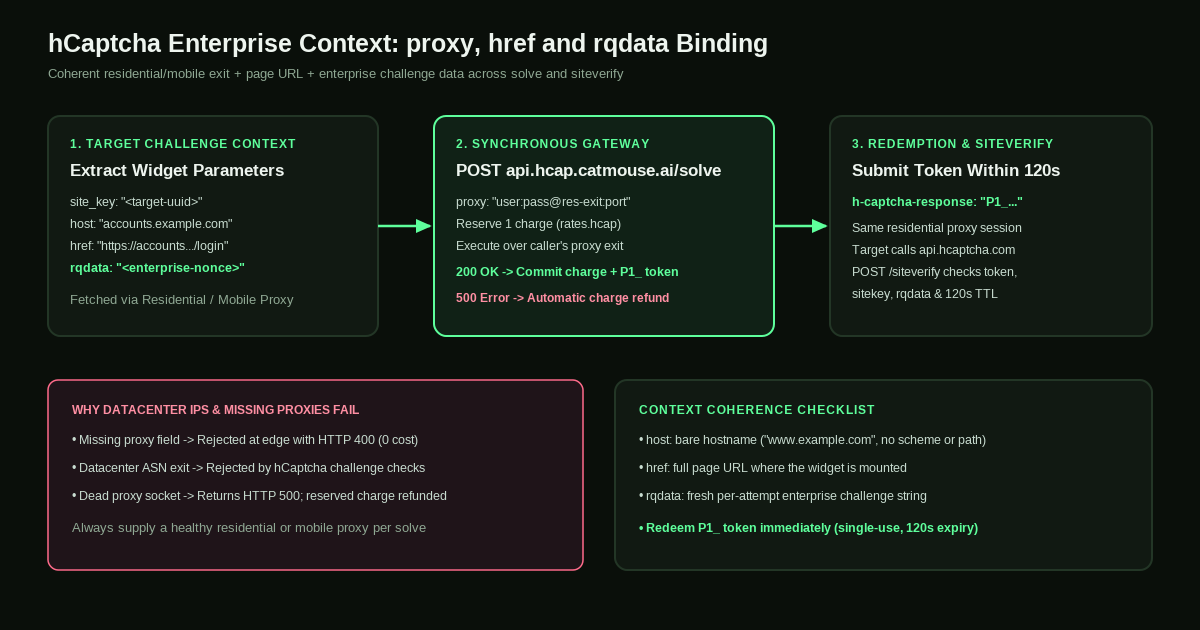
How do you pass proxy, href, and rqdata to the Catmouse gateway?
Include site_key, host, and proxy alongside optional href and rqdata in a single synchronous JSON POST to https://api.hcap.catmouse.ai/solve.
As detailed in our synchronous hCaptcha API architecture guide, the gateway holds the connection until the worker finishes, so set your HTTP client timeout to at least 95 seconds:
curl -X POST https://api.hcap.catmouse.ai/solve \
  -H 'Content-Type: application/json' \
  -H "x-api-key: $KEY" \
  --max-time 95 \
  -d '{
    "site_key": "<hcaptcha sitekey>",
    "host": "www.example.com",
    "proxy": "user:pass@host:port",
    "href": "https://www.example.com/login",
    "rqdata": "<enterprise rqdata string>"
  }'
How do you keep the redemption request coherent?
Follow four rules when redeeming the returned captcha_token against the target site:
- Fetch fresh
rqdataper attempt: Never reuse anrqdatanonce from a prior login attempt; extract the newly issued string before calling/solve. - Keep the bare
hostclean: Pass only the hostname (such aswww.example.com) inhost, and put the full URL inhref. - Use the same residential proxy session: Route the target login or checkout POST through the same sticky residential or mobile proxy exit and secure TLS session passed in the
proxyfield. - Redeem immediately: Submit the
P1_token as soon as the synchronous call returns HTTP200so it does not age out beforesiteverify.
How does edge validation handle missing or dead proxies?
Requests missing a proxy are rejected at the edge with HTTP 400 at zero cost, while proxy failures during execution return HTTP 500 with an automatic charge refund.
Per /hcaptcha.html and RFC 9110, the gateway separates client input errors from runtime proxy failures:
- Missing or malformed
proxy(HTTP400) - Refused at the edge before queueing. Nothing is reserved or charged. Fix the request body before retrying.
- Dead proxy exit or failed solve (HTTP
500) - If the residential proxy drops mid-solve or the challenge provider rejects the attempt, the reserved charge is refunded automatically. Generate a new
task_idand verify proxy health before retrying. - Valid token returned (HTTP
200) - Returns
{ "captcha_token": "P1_...", "task_id": "...", "instant_pass": true }and commits the reserved charge.
How does hCaptcha proxy handling differ from the Kasada API?
The challenge gateway requires a caller proxy on every request. In contrast, the Kasada endpoint (POST /Solver/solve) is offline and never accepts a proxy field.
Both gateways share the same x-api-key credential and unified balance (inspected via GET /v1/client/balance and GET /key/status in /openapi.json), but their network models differ:
- Kasada API (
POST https://kasadaapi.catmouse.ai/Solver/solve): Solves a caller-suppliedips.jsscript body offline. You fetch/fpandips.jsand post to/tlthrough your own proxy; the solver API never touches the target or takes aproxyparameter. - Challenge gateway (
POST https://api.hcap.catmouse.ai/solve): Executes the live widget challenge over the residential or mobileproxyyou supply in the request body.
Key takeaways
- Mandatory residential or mobile proxy: Every call to
POST https://api.hcap.catmouse.ai/solverequires aproxy(user:pass@host:port); datacenter IPs are rejected by hCaptcha. - Zero-cost edge guard: Omitting
proxyreturns HTTP400before queueing and never spends a charge. - Pass
hrefandrqdatawhen present: Forwarding the full page URL and enterprise challenge nonce keeps the solvedP1_token aligned withsiteverify. - Automatic refund on
500: If a proxy drops mid-flight, the reserved charge is refunded automatically; retry with a freshtask_id.
Conclusion and scope
Most downstream rejections of valid P1_ tokens happen because the caller solved the bare site_key without passing the site's rqdata nonce, used a datacenter IP range, or switched proxy exits between solving and redeeming. Supplying a sticky residential or mobile proxy alongside href and rqdata keeps the entire challenge lifecycle coherent.
Scope and authorized use. This guide describes the documented request fields and proxy requirements of the Catmouse hCaptcha gateway as published on /hcaptcha.html on 2026-10-10, without performance or pass-rate benchmarks. Use Catmouse only on systems and applications you own or have explicit written authorization to test.
Evidence and sources
The technical statements in this article are backed by the following primary sources:
- Catmouse hCaptcha API documentation (
/hcaptcha.html). Supports: the endpointPOST https://api.hcap.catmouse.ai/solve, required fields (site_key,host,proxy), optional fields (task_id,href,rqdata), the rule that requests without a proxy are rejected with HTTP400before queueing at zero cost, the requirement for residential or mobile exits because datacenter addresses are rejected by hCaptcha, and automatic charge refunds on failure. Reviewed 2026-10-10. - hCaptcha developer documentation. Supports: single-use verification tokens submitted in
h-captcha-response, verified athttps://api.hcaptcha.com/siteverify, and the 120-second default token expiration window (expired-input-response). Fetched 2026-10-09. - IETF RFC 9110 (HTTP Semantics) and MDN HTTP response status codes. Supports: standard HTTP status definitions for
200,400,401,402,403,429, and500. - Catmouse OpenAPI 3.1 specification (
/openapi.json) and API reference (/reference.html). Supports:POST /Solver/solveoffline Kasada solver behavior (no proxy field) and shared key balance inspection viaGET /v1/client/balanceandGET /key/status. Reviewed 2026-10-10.
Methodology and limits. Documented: all request fields, proxy validation rules, and charge lease behaviors cited above. Not measured or claimed: pass rates, solve latencies, or proprietary hCaptcha internal scoring weights. Reviewed 2026-10-10.
Frequently asked questions
What is rqdata in hCaptcha Enterprise?
rqdata is an optional custom challenge data string supplied by an enterprise site to bind a specific login, checkout, or session nonce to the hCaptcha challenge. When the target supplies rqdata, you must pass it in your solve request so the returned P1_ token matches at siteverify.
Why does hCaptcha reject datacenter proxies?
hCaptcha evaluates the network exit during challenge execution and rejects known cloud and datacenter IP ranges. Every call to POST https://api.hcap.catmouse.ai/solve must supply a residential or mobile proxy in user:pass@host:port format.
What happens if I omit the proxy field on POST https://api.hcap.catmouse.ai/solve?
The gateway rejects a request without a proxy at the edge with HTTP 400 before queueing. Because the request is never queued, no charge is reserved or spent.
Should I redeem the returned captcha_token over the same proxy session?
Yes. Submit the returned P1_ captcha_token to the target endpoint immediately over the same residential or mobile proxy session, since hCaptcha tokens are single-use and expire after 120 seconds by default.
Does the Catmouse Kasada endpoint (/Solver/solve) also require a proxy field?
No. POST /Solver/solve on kasadaapi.catmouse.ai is an offline solver for Kasada ips.js scripts and never accepts a proxy field. Only the hCaptcha gateway (POST https://api.hcap.catmouse.ai/solve) requires a proxy.