Moshtix Bot Detection Bypass: Ticketing Guide
Moshtix bot detection bypass work starts with understanding what the protection asks of a client. That lets a protocol-level client complete the exchange without running a browser. Run it only against moshtix.com.au endpoints that you operate or have written permission to test.
moshtix.com.au is listed as Kasada-protected, and, according to the Catmouse API documentation, the Catmouse solver takes the ips.js script your own client fetched and returns a /tl payload plus x-kpsdk-* headers, which your client then sends to the site.
Who this is for
Engineers and data teams who own, or have explicit written authorization to test, Moshtix and want to understand how its Kasada protection is described in this post before deciding on an approach.
On this page
- How Kasada challenges a client on moshtix.com.au
- Why browser automation is costly for read-heavy workloads (Moshtix)
- Example: posting a fetched ips.js to the solver API (Moshtix)
- Collecting live event ticketing data responsibly
- Scope and limitations
- Evidence and sources
- Frequently asked questions
- Conclusion and next steps
- Who it is for: engineers who are authorized to collect event listings, general admission tiers, and venue booking data from moshtix.com.au and want to understand the challenge flow.
- Protection: Kasada, as listed in the Catmouse targets directory.
How Kasada challenges a client on moshtix.com.au?
For Moshtix, how the challenge and token flow works is the same as for any browser-verified bot management, so it is explained once in the bot-management reference. This section keeps only what is specific to Moshtix.
When a client without a valid session reaches a Kasada-protected endpoint, it is typically served a challenge instead of the page or API payload. The challenge is a non-200 status plus a script the client must run. The Catmouse targets directory lists moshtix.com.au as Kasada-protected. That label has not been re-verified, so confirm it with your own capture before relying on it.
- Challenge delivery: a request without a valid session gets a challenge page (the /fp request) whose
x-kpsdk-ctresponse header your client keeps, and which points to an ips.js script. - Script fetch: your client downloads ips.js itself, with its own session and egress IP, and keeps the body as UTF-8 text.
- Solve: your client posts that body, its URL, the ct token, the served
x-kpsdk-vversion, a timezone name and offset and an engine to/Solver/solve. The API never contacts moshtix.com.au. - Credential use: your client posts the base64-decoded
payloadas the raw body to the site's /tl endpoint with the returnedheaders. Before a protected POST,/Solver/cdproduces a freshx-kpsdk-cdvalue.
The /fp and /tl URL shapes and the /tl header order are target-specific, and they are not verified here for moshtix.com.au.
Why browser automation is costly for read-heavy workloads (Moshtix)?
A full browser per session needs much more memory and CPU than an HTTP client, so scaling a read-heavy job on browsers raises infrastructure cost. We have not measured this on moshtix.com.au, so no figures are given here.
Anti-bot scripts also commonly inspect automation signals such as navigator.webdriver (see Evidence and sources), and patches that overwrite those properties can leave traces of their own. Whether a given setup passes on moshtix.com.au has to be tested, and the answer can change when the protection is updated.
What a protocol-level client changes
With a protocol-level client, Moshtix's script is fetched by your own HTTP code and solved by the API, so no browser process renders the page. The API sees only the script body and the timezone you send; every request to moshtix.com.au still comes from your client and your IP address.
What separates moshtix kasada ticketing bypass telemetry from plain HTTP replay?
In contrast, on moshtix kasada ticketing bypass, you must refresh session state whenever a route returns a challenge instead of reusing old headers.
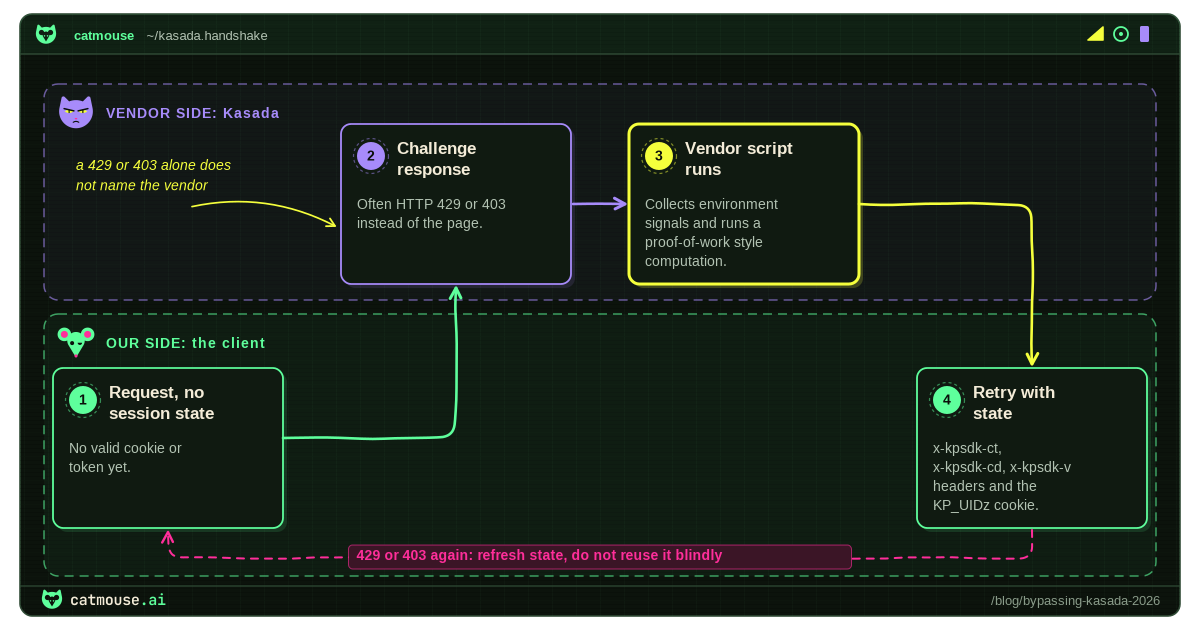
- Challenge bootstrap (moshtix kasada ticketing bypass)
- The initial HTTP challenge response on moshtix kasada ticketing bypass that delivers the vendor script or session seed to the client.
- Session state verification (moshtix kasada ticketing bypass)
- The header or cookie proof returned after telemetry evaluation on moshtix kasada ticketing bypass that authorizes subsequent API calls.
| Stage | Plain HTTP replay on moshtix kasada ticketing bypass | Verified session state on moshtix kasada ticketing bypass |
|---|---|---|
| Initial request | Missing session proof for moshtix kasada ticketing bypass | Bootstraps fresh challenge state for moshtix kasada ticketing bypass |
| Protected route | Challenged with HTTP 403 or 429 on moshtix kasada ticketing bypass | Attaches current session state for moshtix kasada ticketing bypass |
Example: posting a fetched ips.js to the solver API (Moshtix)
The sample below is the canonical solve flow from the Catmouse API samples. The placeholders stand for values your own client fetched from moshtix.com.au. It is not a measured run against moshtix.com.au.
import base64, os, requests

# Steps 1-3 run in YOUR client against YOUR target (authorized use only); the solver API never contacts the target.
# ips_body: UTF-8 text of the ips.js you fetched; ips_url: where you fetched it; ct_token: x-kpsdk-ct of the /fp response;
# kpsdk_v: the x-kpsdk-v the served script declares.
r = requests.post("https://kasadaapi.catmouse.ai/Solver/solve",
    headers={"x-api-key": os.environ["CATMOUSE_KEY"]},
    json={
        "ipsBody": ips_body,
        "ipsUrl": ips_url,
        "ctToken": ct_token,
        "kpsdkV": kpsdk_v,
        "tz": "America/New_York",
        "tzOffset": 240,
        "acceptLanguage": "en-US",
        "engine": "chrome",
    },
    timeout=60)
out = r.json()
if not out.get("success"):
    raise RuntimeError(f"{r.status_code} {out.get('error')}")   # 4xx/5xx are not charged
# Step 5 (your own client): POST base64.b64decode(out["payload"]) as the raw body to the target's /tl URL
# with the headers in out["headers"].
Credential lifetime and reuse
A solve for moshtix.com.au is charged only when a payload comes back, and 4xx or 5xx responses are not charged. How long the resulting credentials stay valid on moshtix.com.au was not measured here, so fetch ips.js again and solve again when a request is challenged. If you sent a timeline and the response carries holdMs, wait that many milliseconds before the /tl request.
How does moshtix kasada ticketing bypass validate a trusted TLS session?
For moshtix kasada ticketing bypass, a client is a verified session when it sends fresh tokens versus static headers over a trusted TLS session.
Collecting live event ticketing data responsibly
The Catmouse targets directory lists event listings, general admission tiers, and venue booking data as typical read targets for moshtix.com.au. This guide covers reading data. It does not cover automated purchasing, queue entry or reservations, and some jurisdictions restrict automated ticket purchasing, so check local law.
Respect the site's terms, applicable law and rate limits, and collect only the data you are authorized to access. If you are unsure whether a use is permitted, get written authorization before sending requests.
Scope, limitations, and recommendations
It contains no benchmark results, success rates or service-level commitments, because none were measured for moshtix.com.au.
The Catmouse API never contacts moshtix.com.au: your own client makes every request to it, and the API receives only the fields of the solve request. Anything about the site that is missing from the evidence list stays unverified until your own capture confirms it.
Last reviewed: .
Evidence and sources
Each source below is paired with the statement in this article that it supports. Quoted text was read on the linked page on 2026-10-09.
- IANA HTTP Status Code Registry and MDN HTTP response status codes: reference definitions for HTTP status codes observed during moshtix kasada ticketing bypass testing.
- HTTP 429 means rate limiting, not a vendor. RFC 6585, section 4: "The 429 status code indicates that the user has sent too many requests in a given amount of time ("rate limiting")."
- HTTP 403 means a refused request, not a vendor. RFC 9110, section 15.5.4: "The 403 (Forbidden) status code indicates that the server understood the request but refuses to fulfill it."
navigator.webdriverreports automation. W3C WebDriver defines the webdriver-active flag, set "when the user agent is under remote control", and MDN describes the property as indicating "whether the user agent is controlled by automation". That scripts can read it is documented; that a particular site acts on it is not claimed here.- Solver request and response fields. The Catmouse OpenAPI document and the API reference are Catmouse's own documentation of its API, not independent evidence about the target. They define the
POST /Solver/solvebody (ipsBody,ipsUrl,ctToken,kpsdkV,tz,tzOffset,engine) and the response fieldspayloadandheaders. The step order comes from the repository reference script for the targets it covers; it was not run against moshtix.com.au for this article. - Kasada runs client-side JavaScript. Kasada's website says it stops bot attacks "without CAPTCHAs" and, in a case study, describes bots that "never executed Kasada's JavaScript". It does not publish the challenge flow, so the step-by-step flow above is a general description, not vendor documentation.
- robots.txt. RFC 9309 (Robots Exclusion Protocol) lets service owners control how automated crawlers may access content. It is not an authorization to bypass a site's controls and does not replace its terms.
- Ticketing law. One example of a jurisdiction restricting automated ticket purchasing is the United States: 15 U.S.C. 45c (BOTS Act) makes it unlawful "to circumvent a security measure, access control system, or other technological control or measure" on a ticketing site used to enforce purchasing limits. It is a US statute; it is not stated here what applies to moshtix.com.au or to you, so check local law.
Methodology and limits
Documented: HTTP status-code meanings, the navigator.webdriver definition, the robots exclusion protocol and Catmouse's own API fields, each cited above. Observation or unverified: which vendor protects the target (taken from the Catmouse targets directory or left unnamed, not re-verified), the general challenge flow, and browser versus HTTP-client cost, which was not measured. Reviewed 2026-10-09. Vendor behaviour changes without notice, so confirm anything you rely on with your own capture.
Frequently asked questions
Which bot protection does moshtix.com.au use?
The Catmouse targets directory lists moshtix.com.au as Kasada-protected. The label was not re-verified on 2026-10-09, so confirm it with your own capture.
Will the solver API always work on moshtix.com.au?
No. Outcomes for Moshtix depend on the target's current configuration, which can change without notice. Test Moshtix with the playground on an endpoint you are authorized to use and re-solve when a request fails.
May I use this on any website?
No. Keep it to moshtix.com.au traffic you operate or have written permission to test, and check the site's terms, its robots.txt and the law where you work.
Conclusion and next steps
If you are authorized to test moshtix.com.au, read the API reference for the solve fields and error codes, check the targets directory for the current listing, and see the pricing page. Read this as a general explanation rather than a test report.
Keep your own capture of the challenge flow for moshtix.com.au, because the /fp and /tl URL shapes and the /tl header order are target-specific and are not verified here.