Airline Scraping Bot Detection Bypass: Protection Types Guide
A protocol-level overview for authorized users: how airline sites challenge automated clients, how to confirm the protection on a host, and what the Catmouse solver does and does not cover (it solves Kasada only).
Who this is for
Engineers and data teams who own, or have explicit written authorization to test, an airline site and want to understand how its bot protection is described in this post before deciding on an approach. Airline terms of use may restrict automated collection of fare data, so read them and obtain permission first.
On this page
- What airline scraping bot detection bypass means in practice
- Why airline sites challenge automated clients
- How a bot-management challenge works at the HTTP level
- How to confirm which protection a host uses
- Python example: posting a fetched Kasada script to the solver
- Handling fare data responsibly
- Scope and limitations
- Evidence and sources
- Frequently asked questions
- Conclusion and recommendations
- Airline sites put a bot-management product in front of fare search. Which product protects a given host must be confirmed per host.
- The Catmouse solver API handles Kasada only. Its endpoint and fields are documented in the Catmouse OpenAPI document.
- No benchmark figures or case studies are published here. Measure on your own workload.
- Collect fare data only from airline hosts where you hold permission, and follow the operator terms.
What airline scraping bot detection bypass means in practice?
Airline scraping bot detection bypass means getting an authorized HTTP client past the client-side challenge that an airline website serves, so the client can read fare and availability data the operator allows it to read. The method depends on the vendor: identify the protection first, then obtain the session state it issues and send that state with ordinary requests. The Catmouse solver API covers Kasada only, so for any airline host that runs another product this guide is background reading, not a recipe.
Why airline sites challenge automated clients?
Operators do not all state why they challenge automated clients. A commonly cited reason is that fare search queries inventory systems and prices change with demand, but that is an assumption, not a documented fact for any particular airline. The mechanism is a bot-management product placed in front of the site.
How a bot-management challenge works at the HTTP level?
A client with no valid session usually gets a challenge or a block instead of the page. The status is typically 429 Too Many Requests (RFC 6585 section 4) or 403 Forbidden (RFC 9110 section 15.5.4). A script then runs in the browser, collects signals about the environment, and sends a result to the edge, which issues session state such as cookies and headers for later requests. Exact names and formats differ by vendor and change between versions.
- Automation signals: the W3C WebDriver specification defines
navigator.webdriver, which is true in a browser under automation control. - Network fingerprints: JA4 TLS fingerprinting summarizes a TLS client hello, and HTTP/2 clients differ in the SETTINGS they send (RFC 9113).
- Behavioural signals: scripts can observe timing and input events, which a plain HTTP client never produces.
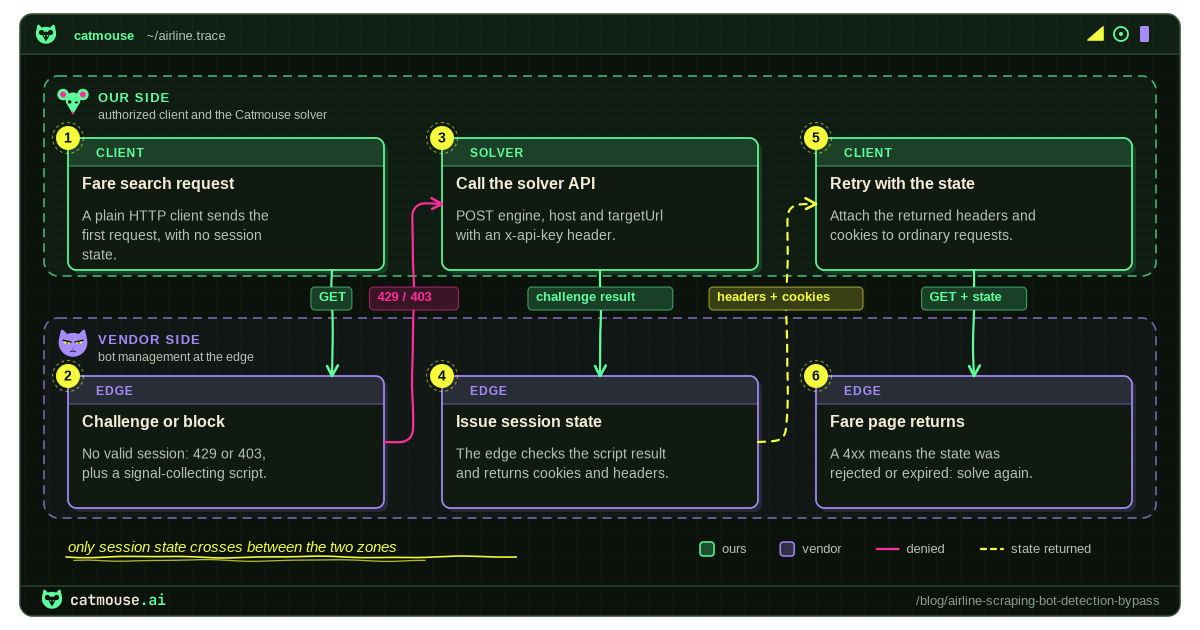
How to confirm which protection a host uses?
Vendors such as Akamai (Bot Manager) and Kasada sell bot-management products, and Kasada's site names an airline and a travel company among its customers (see Evidence and sources). Do not assume the vendor from the industry. Check the host in the Catmouse targets directory, which lists the engine each host maps to, and re-check the live site, because deployments change. When the vendor is not confirmed, describe it as a bot-management protection (vendor not re-verified) in your own notes.
The Catmouse solver API solves one vendor, Kasada. Its engine field selects a Kasada device profile (chrome by default, plus iOS and Android profiles), not a vendor, and the Catmouse OpenAPI document lists no Akamai, DataDome, Turnstile or FunCaptcha engine. A successful response carries success, a base64 payload for the site's /tl URL, and x-kpsdk-* headers. For how the vendors differ, see the bot management reference.
Python example: posting a fetched Kasada script to the solver
The script below is the canonical solve call from the Catmouse API samples and applies only to a host that runs Kasada. It assumes your own client already completed the fetch steps against an authorized airline host that runs Kasada and holds the ips.js text (ips_body), its URL, the x-kpsdk-ct value and the served x-kpsdk-v. The URL and the timezone values are placeholders.
import base64, os, requests

# Steps 1-3 run in YOUR client against YOUR target (authorized use only); the solver API never contacts the target.
# ips_body: UTF-8 text of the ips.js you fetched; ips_url: where you fetched it; ct_token: x-kpsdk-ct of the /fp response;
# kpsdk_v: the x-kpsdk-v the served script declares.
r = requests.post("https://kasadaapi.catmouse.ai/Solver/solve",
    headers={"x-api-key": os.environ["CATMOUSE_KEY"]},
    json={
        "ipsBody": ips_body,
        "ipsUrl": ips_url,
        "ctToken": ct_token,
        "kpsdkV": kpsdk_v,
        "tz": "America/New_York",
        "tzOffset": 240,
        "acceptLanguage": "en-US",
        "engine": "chrome",
    },
    timeout=60)
out = r.json()
if not out.get("success"):
    raise RuntimeError(f"{r.status_code} {out.get('error')}")   # 4xx/5xx are not charged
# Step 5 (your own client): POST base64.b64decode(out["payload"]) as the raw body to the target's /tl URL
# with the headers in out["headers"].
The server's default requires tz and tzOffset (a request without them is a 400 missing geo), and they should match the proxy exit your client uses for the authorized host. The API has no proxy field and never contacts the target. Only a call that returns a payload is charged.
How does airline scraping bot detection bypass validate a trusted TLS session?
For airline scraping bot detection bypass, a client is a verified session when it sends fresh tokens versus static headers over a trusted TLS session.
Handling fare data responsibly
- Store the search inputs (route, dates, passengers, currency, point of sale) with every captured fare, because the same itinerary prices differently across them.
- Respect rate limits and back off on 429 responses.
- Check the airline terms and robots.txt before collecting, and keep records of the permission you rely on.
Scope, limitations, and recommendations
Last reviewed: 2026-10-09. Vendor names in this article describe the kinds of products sold for bot management. Which one protects a given airline host is not asserted here and must be confirmed per host.
- Protection deployments change without notice. A flow that worked on one date can fail on another, so check status and targets before relying on a result.
- Token lifetimes are set by the target site. This article does not state a lifetime. Treat any 4xx response as a signal to request a fresh solve and to slow down.
- This article contains no latency, pass-rate, memory or cost benchmarks. Measure those on your own workload.
- Availability of a data source does not grant permission to collect it. Read the site terms and its robots.txt (RFC 9309) and send solved requests only to airline hosts where you hold permission to collect fare data.
What separates airline scraping bot detection bypass telemetry from plain HTTP replay?
In contrast, on airline scraping bot detection bypass, you must refresh session state whenever a route returns a challenge instead of reusing old headers.
- Challenge bootstrap (airline scraping bot detection bypass)
- The initial HTTP challenge response on airline scraping bot detection bypass that delivers the vendor script or session seed to the client.
- Session state verification (airline scraping bot detection bypass)
- The header or cookie proof returned after telemetry evaluation on airline scraping bot detection bypass that authorizes subsequent API calls.
| Stage | Plain HTTP replay on airline scraping bot detection bypass | Verified session state on airline scraping bot detection bypass |
|---|---|---|
| Initial request | Missing session proof for airline scraping bot detection bypass | Bootstraps fresh challenge state for airline scraping bot detection bypass |
| Protected route | Challenged with HTTP 403 or 429 on airline scraping bot detection bypass | Attaches current session state for airline scraping bot detection bypass |
Evidence and sources
Each source below was opened on 2026-10-09 and the quoted text was read there.
- IANA HTTP Status Code Registry and MDN HTTP response status codes: reference definitions for HTTP status codes observed during airline scraping bot detection bypass testing.
- RFC 6585 section 4: supports the statement that 429 means too many requests. Verbatim: "The 429 status code indicates that the user has sent too many requests in a given amount of time ("rate limiting")."
- RFC 9110 section 15.5.4: supports the statement that 403 means the server refuses the request. Verbatim: "The 403 (Forbidden) status code indicates that the server understood the request but refuses to fulfill it."
- W3C WebDriver: supports the statement that
navigator.webdriverreflects automation control. Verbatim from the Interface section: "Returns true if webdriver-active flag is set, false otherwise." - JA4 technical details: supports the statement that JA4 fingerprints a TLS client. Verbatim: "JA4 looks at the TLS Client Hello packet and builds a fingerprint of the client based on attributes within the packet."
- RFC 9113 section 6.5: supports the statement that HTTP/2 endpoints send SETTINGS. Verbatim: "The SETTINGS frame (type=0x04) conveys configuration parameters that affect how endpoints communicate".
- RFC 9309, Robots Exclusion Protocol: the specification for robots.txt referred to in the scope section.
- Akamai Bot Manager and the Kasada website: support only the statement that these vendors sell bot management products. Akamai: "Akamai Bot Manager effectively detects bot traffic and mitigates malicious bots at the edge". Kasada's site names an airline and a travel company among its customer testimonials.
- Catmouse OpenAPI document and API reference: the source for the solve endpoint, request fields and response fields (
payload,headers,success) used here. The contract was checked against the server source on 2026-10-10. This is our own documentation, so it documents the API but is not independent evidence about any vendor.
Methodology and limits
Statements about HTTP status codes, WebDriver, TLS and HTTP/2 fingerprints and robots.txt are documented in the specifications above. Solver field names are documented in the Catmouse OpenAPI document. The description of how a challenge flows is the general pattern of such products, an observation, not vendor documentation. This article asserts no vendor for any airline host. Vendor behaviour changes without notice. Review date: 2026-10-09.
Frequently asked questions
Which bot-management product do airline websites use?
It varies by airline and changes over time. Several vendors sell these products, so confirm the protection on the specific host you are authorized to test. This article does not assert a vendor for any airline.
Do I still need a headless browser?
Not for the Kasada step on a host that runs Kasada: the solver builds a /tl payload and x-kpsdk-* headers from the script your client fetched, and your own client sends them. The solver does not render pages, so you still need a real browser when you must render JavaScript-built pages or capture what a person would see on an airline host. A solver does not replace a browser in every case.
What do HTTP 429 and 403 responses mean here?
HTTP 429 Too Many Requests is defined in RFC 6585 section 4 and tells a client to slow down. HTTP 403 Forbidden is defined in RFC 9110 section 15.5.4 and means the server understood the request and refuses to fulfil it. Neither status alone identifies which vendor sits in front of the airline.
Is it allowed to use this on any website?
No. Collect fares only from airline sites you own or where the airline has given you written permission, and test only systems you operate. Check the site terms and robots.txt (RFC 9309) first. Catmouse documentation does not grant permission to access a third-party system.
Conclusion and recommendations
Confirm that you are authorized, confirm the protection on the host, and test one request at a time before scaling. The API reference lists every request field, response field and error code. Limits and the review date are in the scope section above.