Request Malformed hCaptcha: siteverify Error Codes and Fixes
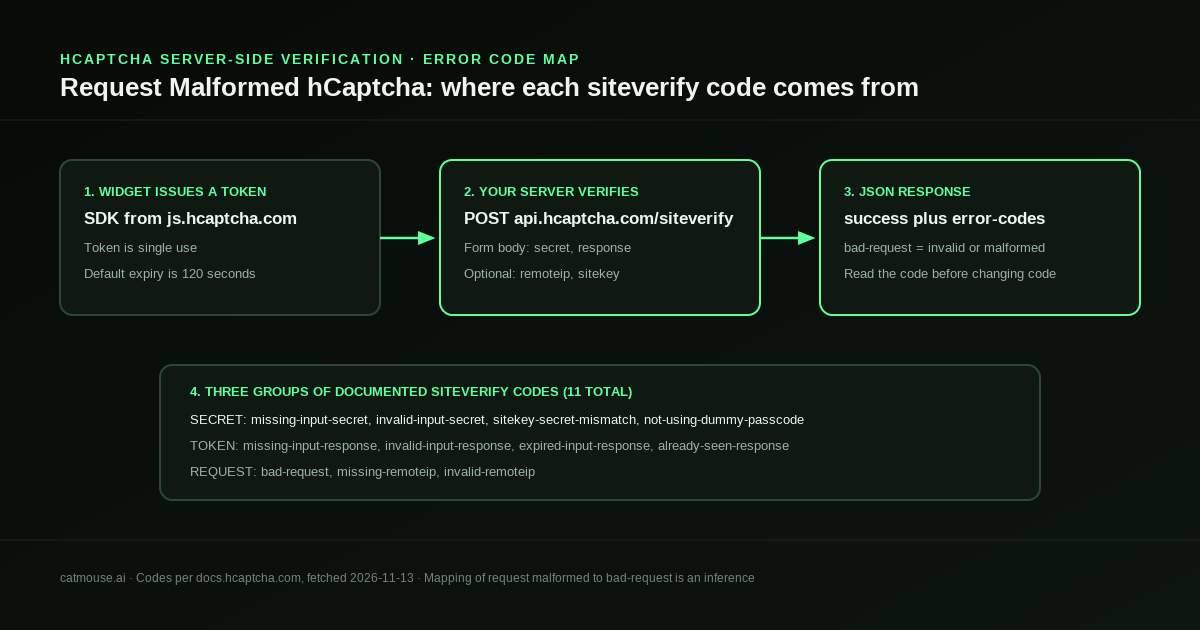
A request malformed hCaptcha message most plausibly maps to the bad-request code, which the official hCaptcha developer guide describes as "The request is invalid or malformed." Below: all 11 documented siteverify codes, the fix for each, working Node.js and Python code, what the hCaptcha hostnames do, and how the Catmouse hCaptcha API reports its own errors.
Who this is for
Developers who call hCaptcha server-side verification and receive an error-codes array, plus engineers who integrate the Catmouse hCaptcha gateway on systems they own or are authorized to test. English and Spanish readers are both covered, and the Spanish answer is near the end.
What does request malformed mean in hCaptcha?
No hCaptcha code is literally named "request malformed." The closest official entry is bad-request, described as "The request is invalid or malformed." Two other siteverify codes also use the words "invalid or malformed" for a secret or a token. The mapping is an inference, labeled as such below.
The phrase usually reaches developers in one of three ways, and they are different problems with different fixes. The table separates them by where the text comes from.
| Source of the message | Exact wording or code | What it points at | Confidence |
|---|---|---|---|
hCaptcha siteverify, error-codes array | bad-request: "The request is invalid or malformed." | The verification call itself is wrong (method, body format or parameters) | Official wording, closest match |
hCaptcha siteverify, error-codes array | invalid-input-secret: "Your secret key is invalid or malformed." | The secret value sent is wrong or damaged | Official wording, same family |
hCaptcha siteverify, error-codes array | invalid-input-response: "The response parameter (verification token) is invalid or malformed." | The token value sent is wrong or damaged | Official wording, same family |
| Any HTTP API | 400 Bad Request (RFC 9110 section 15.5.1) | A client error such as malformed request syntax | Generic HTTP meaning |
| Catmouse hCaptcha gateway | HTTP 400, "malformed request" | The solve request to api.hcap.catmouse.ai failed validation, for example a missing proxy | Catmouse behavior, unrelated to siteverify |
The Spanish query "request malformed hcaptcha que significa" lands on the same cause. No official hCaptcha page fetched on 2026-11-13 uses the exact two-word phrase as a code, so treat bad-request as the most plausible mapping and read the actual error-codes value in your response before changing anything.
Which siteverify error codes does hCaptcha document?
The hCaptcha developer guide lists 11 siteverify error codes, which split into secret problems, token problems and request problems. The table quotes each official description from the guide, fetched 2026-11-13, and adds a suggested fix for every code, from missing-input-secret to sitekey-secret-mismatch.
The Fix column is Catmouse Engineering guidance derived from the documented request contract. The hCaptcha guide does not publish a fix list of its own.
| Code | Official description | Fix |
|---|---|---|
missing-input-secret | Your secret key is missing. | Send the secret form field. Check that the environment variable is loaded in the process that makes the call. |
invalid-input-secret | Your secret key is invalid or malformed. | Copy the secret again from the hCaptcha dashboard Settings page. Trim whitespace and quotes added by your config loader. |
missing-input-response | The response parameter (verification token) is missing. | Send the token as the response form field. Confirm your front end forwards the token to your server. |
invalid-input-response | The response parameter (verification token) is invalid or malformed. | Send the token exactly as issued, unmodified and untruncated. Also check the domain allowlist, which the guide ties to this code. |
expired-input-response | The response parameter (verification token) is expired. (120s default) | Verify immediately after the challenge completes. Request a new token if the form sat open past the expiry. |
already-seen-response | The response parameter (verification token) was already verified once. | Tokens are single use. Verify once per submission and never retry verification with the same token. |
bad-request | The request is invalid or malformed. | Suggested: use POST with an application/x-www-form-urlencoded body. Do not use GET and do not send JSON. |
missing-remoteip | The remoteip parameter is missing. | Send remoteip when your setup requires it. The guide marks it as recommended. |
invalid-remoteip | The remoteip parameter is not a valid IP address or blinded value. | Suggested: send the client IP as a plain address or the blinded value, with no port and no list of addresses. |
not-using-dummy-passcode | You have used a testing sitekey but have not used its matching secret. | Pair a testing sitekey with its matching testing secret, and switch both to production values together. |
sitekey-secret-mismatch | The sitekey is not registered with the provided secret. | Use the secret that belongs to the same account and site as the sitekey in your widget. |
Source: hCaptcha Developer Guide, error code table, fetched 2026-11-13. The guide also documents the response fields success, challenge_ts, hostname, credit (deprecated) and error-codes, plus score and score_reason for Enterprise.
How do you call siteverify without a bad-request?
Send a POST to https://api.hcaptcha.com/siteverify with a form-encoded body holding secret and response. The guide marks both as required, recommends remoteip, accepts an optional sitekey, and says not to call siteverify with GET. A token that passes returns success set to true.
The Node.js example below sends a form-encoded body and reads the error-codes array. It never logs the secret or the token.
// Node.js 18 or newer
async function verifyHcaptcha(token, clientIp, expectedSitekey) {
  const body = new URLSearchParams({
    secret: process.env.HCAPTCHA_SECRET,
    response: token,
    remoteip: clientIp,
    sitekey: expectedSitekey,
  });

  const res = await fetch("https://api.hcaptcha.com/siteverify", {
    method: "POST",
    headers: { "Content-Type": "application/x-www-form-urlencoded" },
    body,
  });

  const data = await res.json();
  if (data.success) return { ok: true };
  return { ok: false, codes: data["error-codes"] || [] };
}
The Python version relies on requests encoding a data dictionary as a form body. Passing json= instead would send a JSON body, which is the most direct way to trigger the format problem described above.
import os
import requests

def verify_hcaptcha(token: str, client_ip: str, expected_sitekey: str) -> dict:
    resp = requests.post(
        "https://api.hcaptcha.com/siteverify",
        data={  # data= sends application/x-www-form-urlencoded
            "secret": os.environ["HCAPTCHA_SECRET"],
            "response": token,
            "remoteip": client_ip,
            "sitekey": expected_sitekey,
        },
        timeout=10,
    )
    body = resp.json()
    if body.get("success"):
        return {"ok": True}
    return {"ok": False, "codes": body.get("error-codes", [])}
The same call as a cURL command, matching the form shown in the guide:
curl https://api.hcaptcha.com/siteverify -X POST \
  -d "secret=$HCAPTCHA_SECRET" \
  -d "response=$HCAPTCHA_TOKEN" \
  -d "remoteip=$CLIENT_IP"
Debugging order for a failing verification
Work through these steps in order. Each step rules out one documented code family before you touch the next.
- Print the
error-codesarray and nothing else. The code names the family, so do not guess from the HTTP status. - If the code is
bad-request, confirm the method is POST and the body is form encoded. - If the code mentions the secret, reload the secret from the dashboard and compare the sitekey owner.
- If the code mentions the response, confirm the token reached the server unchanged and was verified once, soon after issue.
- If the code mentions
remoteip, send a single plain client address.
What are api.hcaptcha.com, js.hcaptcha.com and the other hosts for?
Per the hCaptcha Developer Guide, js.hcaptcha.com serves the client SDK and api.hcaptcha.com hosts the server-side verification endpoint. hcaptcha.com and its subdomains belong in your CSP. The guide does not mention api2, and api-hcaptcha.com with a hyphen is not a documented host.
js.hcaptcha.com- Serves the client SDK. The guide says to include the hCaptcha JavaScript resource in your HTML page.
api.hcaptcha.com- Hosts the verification endpoint at
/siteverify. The guide says the endpoint expects a POST request. hcaptcha.comand*.hcaptcha.com- The entries the guide asks you to add to Content Security Policy directives. It also asks you not to hard-code specific subdomains such as newassets.hcaptcha.com.
dashboard.hcaptcha.com- The account dashboard where you copy the public sitekey from Sites and the secret from Settings.
api2- Not mentioned on the pages fetched on 2026-11-13, so this article does not describe it.
api-hcaptcha.com(hyphen)- Not a host in the guide. The documented verification host uses a dot,
api.hcaptcha.com. Send your secret only to hosts listed in the official documentation.
This answers the search "what is api-hcaptcha.com". The hyphenated form is most plausibly a mistyped version of api.hcaptcha.com, which is an inference and not something the guide states.
Which integration mistakes map to these errors?
Most integration mistakes fall into four groups: a wrong request format, a sitekey or secret mismatch, a token used too late or twice, and a host or environment mismatch. Each maps to a documented code, so the error-codes array tells you which group applies.
- Wrong request format: GET instead of POST, a JSON body, or parameters placed in the URL. Expect
bad-request. The guide says not to use GET for/siteverify. - Sitekey and secret from different sites: Expect
sitekey-secret-mismatch. Passing the optionalsitekeyparameter also stops tokens issued on one sitekey from being redeemed elsewhere, according to the guide. - Testing credentials in production: A testing sitekey with a non-matching secret returns
not-using-dummy-passcode. - Expired or reused tokens: Expect
expired-input-responseafter the 120 second default andalready-seen-responseon a second verification. - Hostname not on the allowlist: Per the configuration guide, which describes the allowlist as an upcoming feature, requests from a hostname that is not on the list fail verification with
invalid-input-response. It also says a sitekey works on any domain by default, and that localhost and 127.0.0.1 are not accepted as hostnames. - Enterprise rqdata: The official pages fetched on 2026-11-13 do not describe
rqdata. The Catmouse hCaptcha page lists it as an optional field to pass through when the site supplies it. See hCaptcha Enterprise rqdata and Residential Proxy Binding for the Catmouse request pattern.
Is it a request problem or a token problem?
A request problem returns bad-request or a missing-input code, while a token problem returns an invalid, expired or already-seen code.
The two groups need different fixes. A fresh token cannot repair a JSON body, and a corrected body cannot revive an expired token. You should fix the request format first, using a plain POST as described on the MDN POST method page, and then verify once with a new token. Do not trust a retry loop that reuses the same token, because already-seen-response is the documented answer to a second verification.
What do the widget-side error codes mean?
Widget-side codes are a separate list from siteverify codes. The configuration guide documents 10 of them, passed to the error-callback or returned as rejection data from async execute, and they describe browser-side problems such as network loss, a closed challenge or a script that failed to load.
| Code | Meaning (from the configuration guide) |
|---|---|
rate-limited | User has sent too many requests |
network-error | There are network connection issues (e.g. offline) |
invalid-data | Invalid data is not accepted by endpoints |
challenge-error | Challenge encountered error on setup |
challenge-closed | User closed the challenge |
challenge-expired | Time limit to answer challenge has expired |
missing-captcha | No captcha was found |
invalid-captcha-id | Captcha does not exist for ID provided |
internal-error | hCaptcha client encountered an internal error |
script-error | hCaptcha JS SDK could not be loaded |
Source: hCaptcha configuration guide, fetched 2026-11-13. The guide marks challenge-closed, challenge-expired, missing-captcha and invalid-captcha-id as thrown only with async execute.
How do widget errors differ from siteverify errors?
Widget codes are raised in the browser and handed to your callbacks, whereas siteverify codes come back in the error-codes array of the server response.
None of the widget names appear in the siteverify table, so the code itself tells you which layer failed. However, a browser-side code says nothing about your secret or your request format, and a siteverify code says nothing about the visitor's network. You should log both layers separately instead of merging them into one error counter.
How does the Catmouse hCaptcha API report errors?
The Catmouse hCaptcha gateway reports errors as HTTP status codes on POST https://api.hcap.catmouse.ai/solve, not as siteverify error codes. A 400 means a malformed request that you must fix before retrying, and a request rejected at the edge is never charged.
| Status | Meaning on the gateway | Client action |
|---|---|---|
200 | Redeemable token returned in captcha_token | Use the token immediately, since hCaptcha tokens expire quickly |
400 | Malformed request, for example a missing proxy | Fix the payload. Do not retry unchanged. Never charged |
401 | Missing or wrong key | Send the x-api-key header with a valid key |
402 | Insufficient balance | Top up the USD balance |
403 | Key disabled | Use a key that is enabled |
429 | More solves in flight than the key's cap | Wait for in-flight calls to finish, then retry |
500 | Solve failed | Retry with a new task_id |
The gateway holds the connection until the solve finishes, so set a client timeout of at least 95 seconds. The example below separates the 400 case, which needs a code change, from the 500 case, which needs a new attempt.
import os
import uuid
import requests

def solve_hcaptcha(site_key: str, host: str, proxy: str) -> str:
    for attempt in range(2):
        resp = requests.post(
            "https://api.hcap.catmouse.ai/solve",
            headers={"x-api-key": os.environ["CATMOUSE_KEY"]},
            json={
                "site_key": site_key,
                "host": host,            # bare hostname, no scheme or path
                "proxy": proxy,          # required: user:pass@host:port
                "task_id": str(uuid.uuid4()),
            },
            timeout=95,
        )
        if resp.status_code == 200:
            return resp.json()["captcha_token"]
        if resp.status_code == 400:
            raise ValueError("malformed request, fix the payload before retrying")
        if resp.status_code != 500:
            resp.raise_for_status()
    raise RuntimeError("solve failed twice")
The Catmouse 400 and the hCaptcha bad-request are different events. The first is returned by the gateway when your solve request fails validation. The second appears in a siteverify response from hCaptcha when the verification call is wrong. The solve request fields are documented on the hCaptcha API page, and the charge behavior is explained in Synchronous hCaptcha API Design and Two-Phase Charge Leasing. For how hCaptcha tokens are issued, verified and expired, see Riot Games hCaptcha: How Enterprise Tokens Work. Endpoint rates are on pricing and the broader contract is in the API reference.
Qué significa request malformed en hCaptcha
Request malformed en hCaptcha significa que la solicitud de verificación es inválida o está mal formada. El código oficial más cercano es bad-request y su descripción es "The request is invalid or malformed". Envía un POST con cuerpo application/x-www-form-urlencoded, con los campos secret y response.
La frase exacta request malformed no aparece como código en la documentación oficial consultada el 2026-11-13, así que esta correspondencia es la interpretación más probable y no una afirmación de hCaptcha. Antes de cambiar nada, lee el valor real del arreglo error-codes en la respuesta.
- Usa POST. La guía indica que no se debe llamar a siteverify con GET.
- Envía el cuerpo como formulario, no como JSON, a https://api.hcaptcha.com/siteverify.
- Incluye
secretyresponse. Se recomienda enviar tambiénremoteip. - Verifica el token una sola vez y poco después de emitirlo. El plazo por defecto es de 120 segundos.
- Si recibes un 400 de la API de Catmouse, es otro error. Significa que tu solicitud a
api.hcap.catmouse.ai/solveno pasó la validación, por ejemplo por falta del campoproxy.
Los ejemplos de código en Node.js y Python de la sección en inglés sobre siteverify funcionan igual para lectores en español. Para ver los campos de la API de Catmouse, abre la página de API de hCaptcha.
Key takeaways
The main points are short and each one is backed by the cited documentation. Read the error-codes array, treat bad-request as a request format problem, verify each token once and quickly, and keep Catmouse gateway statuses separate from hCaptcha siteverify codes.
bad-requestis the closest official match for request malformed: the description is "The request is invalid or malformed." The mapping is an inference.- 11 siteverify codes are documented: they group into secret codes, token codes and request codes.
- Tokens are single use: the guide says a token can only be used once and must be verified within a short period after it is issued, with a 120 second default expiry.
- Hosts have fixed roles: js.hcaptcha.com serves the SDK and api.hcaptcha.com verifies. api-hcaptcha.com is not documented.
- The Catmouse 400 is separate: it comes from the solve gateway and is never charged.
Conclusion and Architecture Recommendations
Treat the error-codes array as the source of truth, wrap siteverify in one small function, and log codes without secrets or tokens. Keep a clear boundary between hCaptcha verification errors and Catmouse gateway statuses so each failure routes to the right fix.
- Centralize verification in one function that sends a form-encoded POST and returns the
error-codeslist. - Map each code group to an action: fix configuration for secret codes, ask the user to retry for token codes, fix the call for request codes.
- Never retry
already-seen-responseorbad-requestwith the same input. - Log the code names only. Do not log the secret, the token or the Catmouse key.
- Set a client timeout of at least 95 seconds for the Catmouse gateway and treat a 400 as a code change, not a retry.
Scope and limitations. This article describes hCaptcha behavior as documented on docs.hcaptcha.com on 2026-11-13 and Catmouse behavior as documented on the hCaptcha API page. It makes no pass-rate or speed claims, and results depend on each site's configuration. Use Catmouse only on systems you own or are authorized to test. Create a key on signup and check rates on pricing.
Evidence and sources
Every factual claim in this article traces to one of the primary sources below. Official hCaptcha pages were fetched on 2026-11-13, and the Catmouse pages were read from the site repository on the same date.
- hCaptcha Developer Guide. Supports: the 11 siteverify error codes and descriptions, the POST requirement, form-encoded parameters, the 120 second default expiry, single-use tokens, and the hostnames. Fetched 2026-11-13.
- hCaptcha configuration guide. Supports: the 10 widget error codes and the domain allowlist behavior. Fetched 2026-11-13.
- IETF RFC 9110 (HTTP Semantics). Supports: the meaning of 400 Bad Request.
- Catmouse hCaptcha API page (its request, response, field and FAQ blocks). Supports: the
/solvefields, the status codes 200, 400, 401, 402, 403, 429 and 500, and the 95 second timeout. Reviewed 2026-11-13.
Methodology and limits. Built from the fetched documentation and the Catmouse site sources. The mapping of "request malformed" to bad-request is an inference, and no official page names the phrase as a code. No benchmarks or success rates are claimed. Reviewed 2026-11-13.
Frequently asked questions
These five answers cover the questions that this article set out to resolve about hCaptcha error codes and hostnames. Each answer mirrors the structured data on this page and each draws only on the documented behavior cited above.
What does request malformed mean in hCaptcha?
It most plausibly maps to the siteverify error code bad-request, which the official hCaptcha developer guide describes as "The request is invalid or malformed." No official code is literally named request malformed, so read the error-codes array in your response to confirm.
How long is an hCaptcha token valid?
The hCaptcha developer guide gives a 120 second default for verification and lists expired-input-response for late tokens. It also says tokens are single use, so a second verification of the same token returns already-seen-response.
Is api-hcaptcha.com an official hCaptcha host?
No. The official guide documents api.hcaptcha.com with a dot for the siteverify endpoint and js.hcaptcha.com for the client SDK. The hyphenated form is not documented, so send your secret only to hosts named in the official documentation.
Does the Catmouse hCaptcha API return siteverify error codes?
No. The gateway at https://api.hcap.catmouse.ai/solve reports errors as HTTP status codes 400, 401, 402, 403, 429 and 500. Siteverify codes come from hCaptcha when the target site or your own server verifies a token.
Does a 400 from the Catmouse hCaptcha API mean hCaptcha rejected my token?
No. A 400 from the gateway means the solve request was malformed, for example a missing proxy field. It is rejected at the edge, never charged, and should be fixed before retrying. It is unrelated to a bad-request code from siteverify.