ThreatMetrix Session Profiling: Web Tags vs Mobile SDK Telemetry
ThreatMetrix session profiling is an out-of-band device-risk workflow where a client submits browser tags (fp/tags.js, clear.png) or mobile SDK telemetry (TMXProfiling) keyed by org_id and session_id before the merchant backend scores the checkout. Below: how web and mobile tracks compare, and how to inspect them in HAR captures.
Who this is for
Security engineers and fraud-prevention architects examining how e-commerce, ticketing, and financial applications combine edge bot defenses with LexisNexis ThreatMetrix session profiling on systems they own or are explicitly authorized to test.
On this page
- How do org_id and session_id bind device telemetry to checkout?
- How do ThreatMetrix web tags differ from the native mobile SDK?
- Why do unpopulated or mismatched session_id tokens fail at checkout?
- How does ThreatMetrix interact with edge bot defenses like Kasada?
- How do you inspect ThreatMetrix beacons in a HAR capture?
- Key takeaways
- Conclusion and scope
- Evidence and sources
- Frequently asked questions
How do org_id and session_id bind device telemetry to checkout?
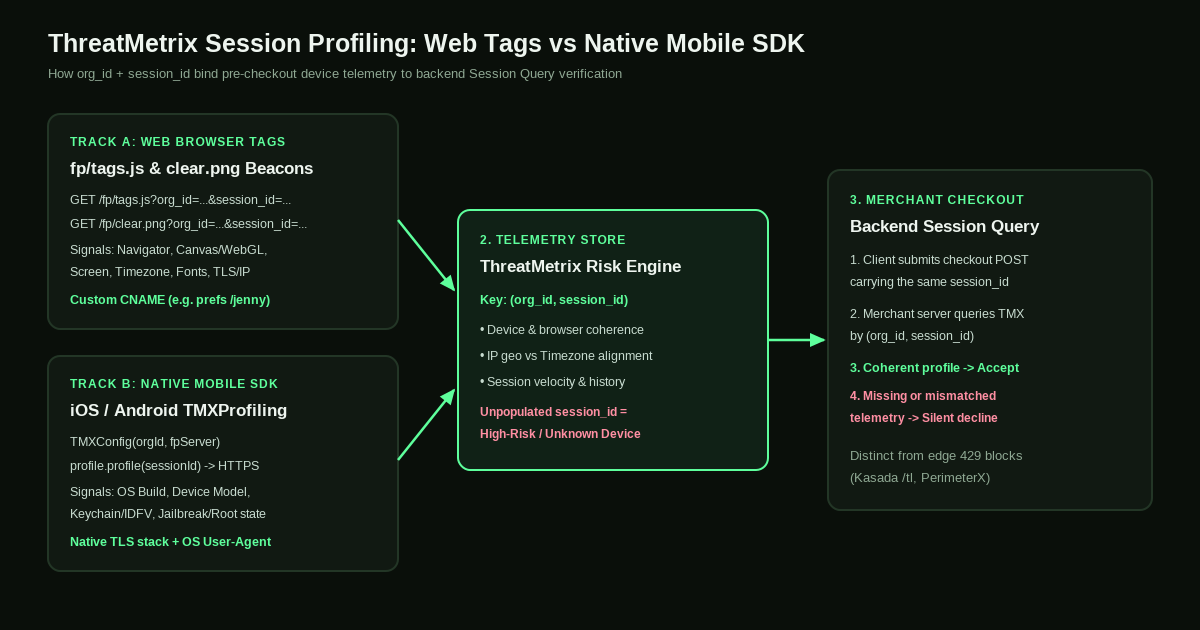
The client sends device telemetry tagged with its organization and session identifiers to the profiling collector first, and the merchant backend later queries ThreatMetrix using that same pair.
Two-step out-of-band correlation between client beacons and backend Session Query
As introduced in our ThreatMetrix device fingerprinting overview, LexisNexis ThreatMetrix (product page) does not sit inline as a reverse proxy blocking HTTP requests with 403 or 429 status codes. Instead, it operates on a two-step out-of-band correlation model:
- Client-side profiling (pre-checkout): When a user opens a login, cart, or payment page, the application generates a unique
session_id(often prefixed with the merchant identifier) and combines it with the merchant's 8-characterorg_id. The browser or mobile app sends device, network, and environment signals tagged with(org_id, session_id)to the ThreatMetrix profiling server (h.online-metrix.netor a first-party CNAME). - Server-to-server Session Query (at checkout): When the user submits the login or payment POST request, the application includes that same
session_idin the form or JSON body. The merchant's backend server then makes an API call to the LexisNexis Risk Defense Engine with(org_id, session_id)plus transaction attributes to retrieve the device risk score.
How do ThreatMetrix web tags differ from the native mobile SDK?
Web tags collect browser DOM, Canvas, WebGL, and font signals via JavaScript, whereas native mobile SDKs collect OS build, hardware model, and device-integrity signals via iOS and Android APIs.
Many large retailers (such as Walmart) and ticketing platforms expose both a web storefront and native iOS/Android applications. While both channels feed the same (org_id, session_id) ledger on the backend, the telemetry collectors differ substantially:
Track A: Web profiling tags (fp/tags.js and fp/clear.png)
In a web browser, profiling starts by loading /fp/tags.js?org_id=<8-char-id>&session_id=<uuid>, often disguised under a first-party CNAME path (for example, /jenny/ or /prefs/) so ad blockers do not strip the tag. The script executes inside the page context, probes browser APIs (navigator, screen geometry, Canvas/WebGL rendering, installed fonts, audio context, and timezone), and dispatches follow-up beacons including /fp/clear.png and encrypted POST payloads.
Track B: Native iOS and Android SDK (TMXProfiling)
In a native mobile app, there is no DOM or browser Canvas unless a WebView is used. Instead, the application links the native ThreatMetrix SDK (TMXProfiling on iOS and Android), configures it with the merchant's org_id and profiling domain, and invokes a profiling request that returns a session_id.
| Dimension | Web Browser Tag (fp/tags.js) | Native Mobile SDK (TMXProfiling) |
|---|---|---|
| Primary entry point | GET /fp/tags.js?org_id=...&session_id=... | TMXProfiling.sharedInstance().profile(...) |
| Hardware & rendering signals | Canvas 2D hash, WebGL renderer string, screen & window dimensions | Device model identifier, OS build version, screen scale, CPU architecture |
| Persistence identifiers | First-party cookies, localStorage, ETag / cache tokens | iOS IDFV / Keychain items, Android device & installation identifiers |
| Integrity & environment checks | WebDriver flags, headless browser traits, DevTools timing | Jailbreak / root file paths, debugger attachment, simulator detection |
| Network & transport | Browser TLS ClientHello, HTTP/2 settings, WebRTC IP probe | Native OS TLS stack (URLSession / OkHttp), carrier & Wi-Fi interface state |
Why do unpopulated or mismatched session_id tokens fail at checkout?
When a checkout request carries an unpopulated session_id, the backend risk query flags the transaction. The same failure occurs if your proxy IP or timezone contradicts the checkout call.
Web tags are easier for a merchant to deploy across a storefront without an app store release. In contrast, native mobile SDKs provide deeper hardware and OS integrity signals, though they require app updates whenever the library changes. On the testing side, every profiling beacon to /fp/clear.png returns HTTP 200 OK (RFC 9110) even when the payload is incomplete. However, the final checkout POST still fails with a generic payment decline.
Three failure modes in session_id correlation
A checkout Session Query fails when the client breaks any of these three invariants:
- Unpopulated
session_id - Generating a random UUID in a script and passing it as the checkout
session_idwithout executing the profiling sequence leaves the key empty in the risk database. When the merchant server queries thatsession_id, no device telemetry exists. - Premature submission (race condition)
- Submitting the checkout POST before the asynchronous
fp/tags.jsbeacons finish uploading causes the merchant backend to query the session before the profile is committed. - Cross-channel or geo mismatch
- Populating a
session_idusing a desktop web tag over one proxy IP and redeeming thatsession_idon a mobile API endpoint or from a different geographic ASN creates an immediate device-and-location contradiction.
How does ThreatMetrix interact with edge bot defenses like Kasada?
Edge bot managers block automated traffic at the perimeter before it reaches the origin, whereas ThreatMetrix scores transaction and account risk at the application layer.
On multi-layered targets, a single checkout flow may pass through two or three distinct systems:
- Perimeter gatekeeper (e.g. Kasada or PerimeterX): Enforces client-side proof-of-work and telemetry (
/fp,ips.js,/tl) at the CDN edge, issuing short-lived headers such asx-kpsdk-ctandx-kpsdk-cd. Catmouse'sPOST /Solver/solveAPI addresses this Kasada perimeter layer. - Interactive challenge (e.g. hCaptcha Enterprise): Steps in on login or high-demand actions requiring a single-use
P1_token bound torqdata. Catmouse's hCaptcha gateway addresses this layer. - Transaction risk profiler (ThreatMetrix): Evaluates whether the
(org_id, session_id)device profile, IP geography, and account history look trustworthy at the moment of payment or account creation.
How do you inspect ThreatMetrix beacons in a HAR capture?
Filter your recorded HAR session by org_id= or session_id= in HarFiddle on macOS to trace the exact lifecycle of the profiling token from page load to checkout.
Because merchants frequently map ThreatMetrix behind a custom first-party CNAME, searching a HAR file for online-metrix.net will miss disguised beacons. Instead, search the query strings in HarFiddle's Inspector for the 8-character org_id parameter, verify the timestamp when the last beacon returned HTTP 200, and confirm that the exact same session_id value is forwarded in the subsequent login or checkout POST body.
Key takeaways
- Out-of-band correlation: ThreatMetrix links client-side profiling beacons to backend checkout verification using the
(org_id, session_id)pair. - Web vs Mobile SDK: Web tags (
fp/tags.js,clear.png) gather browser DOM/Canvas signals, while native mobile SDKs (TMXProfiling) gather OS and hardware signals. - Silent HTTP 200 beacons: Collector endpoints return
200 OKeven on bad data; the accept or decline decision occurs when the merchant backend runs its Session Query. - Order of operations: Profiling beacons must complete over a coherent proxy and timezone before the checkout POST carrying that
session_idis submitted.
Conclusion and scope
Understanding the boundary between perimeter bot management and out-of-band session profiling prevents misdiagnosing checkout declines. While edge gatekeepers enforce request headers at the CDN, ThreatMetrix correlates pre-checkout device telemetry against backend transaction queries via org_id and session_id.
Scope and authorized use. This article provides an architectural comparison of ThreatMetrix web and mobile session profiling based on public documentation and standard HTTP inspection. As defined in /openapi.json, Catmouse's POST /Solver/solve endpoint solves Kasada challenges and POST https://api.hcap.catmouse.ai/solve solves hCaptcha challenges; neither generates ThreatMetrix payloads. Inspect and test traffic only on systems you own or have explicit written authorization to test.
Evidence and sources
The technical descriptions in this article draw on the following primary references:
- LexisNexis ThreatMetrix product documentation. Supports: the ThreatMetrix Digital Identity Network architecture, device fingerprinting across web browsers and native mobile SDKs, and real-time risk scoring at login and checkout.
- IETF RFC 9110 (HTTP Semantics) and MDN HTTP response status codes. Supports: HTTP status code semantics (
200 OK,403 Forbidden,429 Too Many Requests) distinguishing silent telemetry beacons from edge proxy blocks. - Catmouse OpenAPI 3.1 specification (
/openapi.json), API reference (/reference.html), and hCaptcha API documentation (/hcaptcha.html). Supports: the exact scope of Catmouse's Kasada and hCaptcha endpoints. Reviewed 2026-10-10.
Methodology and limits. Documented: public ThreatMetrix session-profiling concepts (org_id, session_id, web tags vs mobile SDKs) and Catmouse API scope. No proprietary vendor scoring formulas or performance benchmarks are claimed. Reviewed 2026-10-10.
Frequently asked questions
How do org_id and session_id work in ThreatMetrix?
org_id is an 8-character identifier assigned to the merchant organization, and session_id is a per-transaction UUID or token generated before profiling. The client sends device signals tagged with (org_id, session_id) to the profiling host, and the merchant server later queries ThreatMetrix using that same pair during login or checkout.
How does ThreatMetrix web profiling differ from the native mobile SDK?
Web profiling loads fp/tags.js and fp/clear.png beacons (often under a first-party CNAME) to collect browser DOM, Canvas, WebGL, and network attributes. Native iOS and Android apps embed the TMXProfiling SDK to collect OS build identifiers, hardware model strings, keychain or vendor IDs, and jailbreak or root indicators.
Why does a checkout request fail when session_id is generated randomly without running the tag?
If the client submits a random session_id that never completed profiling against the ThreatMetrix collector, the merchant backend's Session Query finds no telemetry record for that session_id and flags or declines the transaction.
How does ThreatMetrix differ from edge anti-bot gatekeepers like Kasada?
Edge gatekeepers like Kasada block requests at the CDN or reverse proxy with HTTP 429 until a valid x-kpsdk-ct token is presented. ThreatMetrix is a fraud and device-risk intelligence engine: its beacons return HTTP 200 silently, and the accept/decline decision happens later when the merchant backend scores the checkout.
Does the Catmouse /Solver/solve endpoint generate ThreatMetrix payloads?
No. As defined in /openapi.json, POST /Solver/solve on kasadaapi.catmouse.ai solves Kasada challenges (ips.js and /tl) and POST https://api.hcap.catmouse.ai/solve handles hCaptcha challenges. ThreatMetrix is covered here for architectural comparison because retailers often layer it behind edge bot protection.